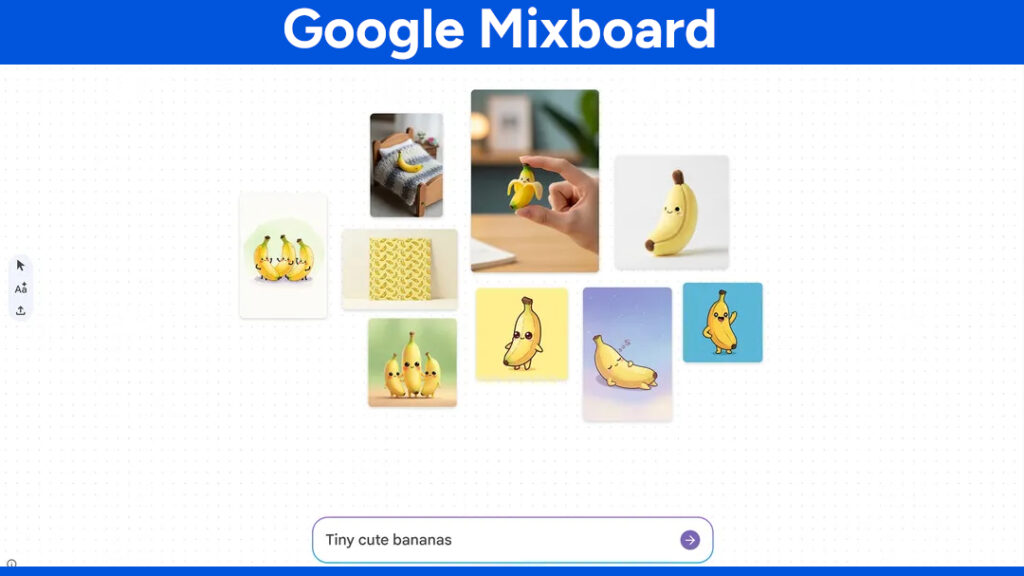
Google Mixboard was an experimental AI-powered concepting board from Google Labs that helped users turn ideas into visual boards using text prompts, images, and generative AI.
If you are searching for how to use Google Mixboard, there is an important 2026 update to know. Google shut down Mixboard on September 28, 2026. The service is no longer available, and Google says boards, generated images, prompts, uploaded assets, and shared links can no longer be accessed after the shutdown.
Best Drawing Tablets for AI Visual Brainstorming
AI tools can generate ideas quickly, but a drawing tablet can make the creative process more hands-on. If you sketch concepts, annotate references, or work with image-editing software, a pen tablet gives you more precise control than a mouse.
These are useful options to consider if you want to continue the kind of visual brainstorming that Mixboard encouraged.
Wacom Intuos and Wacom One
Wacom Intuos and Wacom One are worth considering if you want a relatively simple setup for sketching, annotating images, and digital brainstorming. A pen tablet can also be useful alongside AI image-generation tools when you want to draw rough ideas before refining them digitally.
Check Wacom Intuos and Wacom One on Amazon
XP-PEN Artist and Deco Series
XP-PEN Artist and Deco tablets offer another option for creators who want more screen-based drawing choices or a larger working area. Display models are particularly useful if you prefer drawing directly where you see the artwork.
Check XP-PEN Artist and Deco tablets on Amazon
iPad Air or iPad Pro With Apple Pencil
If portability matters, an iPad Air or iPad Pro with Apple Pencil can provide a more flexible creative setup. You can sketch, annotate reference images, organize ideas, and move between different creative applications without being tied to a desktop workstation.
Check iPad Air and iPad Pro options on Amazon
Before it was discontinued, Mixboard offered an interesting approach to AI-assisted visual brainstorming. You could start with a simple idea, generate images, bring in your own references, edit visuals with natural language, and organize everything on a large digital canvas.
This guide explains what Google Mixboard was, how Mixboard worked, its main features, what changed before the shutdown, and which tools and hardware can help you continue similar visual brainstorming workflows.
What Was Google Mixboard?
Google Mixboard was an experimental AI concepting tool from Google Labs. Instead of working on a traditional linear design canvas, users could arrange images and text on an open board and use AI to explore different versions of an idea.
It was designed for early-stage creative work rather than replacing a full professional design application. You could use it to plan a room, explore a product idea, create an event concept, develop a storyboard, or collect visual references for a project.
Google described Mixboard as a tool for exploring, expanding, and refining ideas. It combined an open canvas with generative AI so users could create new visuals instead of only collecting existing images.
Is Google Mixboard Still Available?
No. Google officially shut down Mixboard on September 28, 2026.
Google’s current Mixboard Help page states that the website was taken offline after the shutdown date. User boards, generated images, prompts, uploaded assets, and other Mixboard data are no longer accessible. Previously shared Mixboard links and presentations also stopped working.
That means you cannot create a new Mixboard project today. If you find older articles claiming that Mixboard is currently available as a public beta, those articles are outdated.
2026 update: Mixboard was a Google Labs experiment, not a permanent Google product. Google has now ended the experiment and is applying what it learned to future creative tools.
How Google Mixboard Worked
Although Mixboard is no longer available, understanding how it worked is useful if you are looking for similar AI concepting tools.
1. Start With an Idea
Mixboard allowed users to begin with a natural-language description. You could describe the project you wanted to visualize rather than manually building everything from an empty canvas.
For example, a prompt could describe a minimalist home office with warm lighting, wooden furniture, plants, and a neutral color palette.
2. Generate Visual Ideas
Mixboard could generate visual content from your prompt. Its AI image tools were designed for rapid experimentation, so you could explore several possible directions instead of spending a long time creating a single concept.
The original version used Google’s Nano Banana image model for image generation and editing. Google later added newer capabilities, including Nano Banana Pro-powered presentation generation.
3. Add Your Own Images
Mixboard was not limited to AI-generated images. Users could bring their own visual references into a project and combine them with generated content.
Later updates expanded supported content types, including PDFs. Users could also add photos and other reference material to build a more useful visual starting point.
4. Edit With Natural Language
One of Mixboard’s most interesting features was its natural-language editing workflow. Instead of navigating through complicated image-editing controls, users could describe the change they wanted.
- Change the color of an object.
- Combine elements from different images.
- Change the lighting or background.
- Create a new variation of an existing idea.
- Add or change text based on the content of the board.
5. Create Multiple Boards
Google expanded Mixboard’s canvas and later introduced multiple boards within a project. This made it possible to separate different concepts or stages of the same project.
For example, a product designer could keep research references on one board, early concepts on another, and the preferred direction on a final board.
6. Turn a Board Into a Presentation
One of the later Mixboard updates allowed users to transform board content into presentations using Nano Banana Pro. The feature combined the visual information and context from a board to create a presentation with images and text.
This extended Mixboard beyond simple mood boards and made it more useful for presenting early concepts to other people.
Google Mixboard Features
Before the shutdown, Mixboard offered several features that made it different from a traditional mood board.
- AI image generation: Create visual concepts from natural-language prompts.
- Natural-language editing: Describe changes instead of manually editing every element.
- Image remixing: Combine elements and styles from different references.
- More Like This: Generate variations of visual ideas.
- Custom uploads: Add your own images and other supported files.
- Context-aware text: Generate text based on the images and ideas on the board.
- Multiple boards: Organize different concepts inside one project.
- Presentation generation: Turn a board into a presentation using Google’s newer image-generation technology.
- Large canvas: Google expanded the board size during the product’s development.
What Could You Use Mixboard For?
Mixboard was aimed at visual exploration rather than traditional graphic design. Some of its practical use cases included:
- Home decoration: Explore furniture, colors, materials, and room layouts.
- Event planning: Build visual concepts for weddings, parties, and other events.
- Product ideas: Explore packaging, product styles, and early concepts.
- Storyboarding: Develop visual directions for stories, videos, and presentations.
- DIY projects: Visualize ideas before starting a physical project.
- Marketing concepts: Explore campaign themes and visual directions.
- Personal projects: Create mood boards for travel, fashion, hobbies, or creative work.
Google Mixboard vs Pinterest
Mixboard and Pinterest could both be used for visual inspiration, but their workflows were different.
- Pinterest: Primarily focuses on discovering and saving existing content from the web.
- Mixboard: Focused more on generating, editing, combining, and organizing visual ideas with AI.
If your goal is collecting real-world references, Pinterest remains useful. If you want to generate new concepts from a prompt, you will need a current AI creative tool instead of Mixboard.
What Should You Use Instead of Google Mixboard?
Since Mixboard is no longer available, the best replacement depends on what you were using it for.
- Google Flow: Useful for AI-assisted visual and video creation using Google’s newer generative models.
- Pinterest: Useful when your main goal is collecting and organizing visual references.
- FigJam: Useful for collaborative brainstorming and visual planning.
- Adobe Firefly: Useful for AI image generation and editing workflows.
- Canva: Useful for combining AI-generated content with templates and conventional design tools.
The right replacement depends on whether you need AI image generation, collaboration, presentation creation, or a simple visual reference board.
How to Build a Mixboard-Style Workflow Today
You do not need Mixboard to follow the same basic creative process. A simple workflow can combine an AI image tool, a visual canvas, and a drawing device.
- Start with a written idea. Describe the project, style, audience, colors, and visual direction.
- Generate several visual directions. Do not settle on the first AI-generated result.
- Collect useful references. Add photographs, sketches, screenshots, color references, or existing design material.
- Annotate and refine. Use a drawing tablet or stylus when precise sketches and notes are useful.
- Choose one direction. Move the strongest ideas into your preferred design, presentation, or image-editing application.
- Export the finished work. Keep your final images, presentations, and source material organized so they are easy to reuse.
What Happened to Your Old Mixboard Projects?
If you used Mixboard before the shutdown, Google provided an export process before September 28, 2026. Users could open their projects, select a board, and download its images as a ZIP file.
After the shutdown, Google says Mixboard data is no longer accessible. Previously shared board URLs and presentations also stopped working.
If you still have downloaded Mixboard images, you can import them into another visual workspace or AI design tool and continue developing the project from there.
Was Google Mixboard Free?
Mixboard was provided as a Google Labs experiment rather than a conventional paid design application. However, access and usage limits could change while Google was testing the product.
Because Mixboard has now been discontinued, there is no current Mixboard subscription or active version to sign up for.
Frequently Asked Questions About Google Mixboard
What is Google Mixboard?
Google Mixboard was an experimental AI-powered concepting board from Google Labs. It allowed users to combine text, images, AI-generated visuals, and natural-language editing on a large visual canvas.
Can I still use Google Mixboard?
No. Google shut down Mixboard on September 28, 2026. The Mixboard website and user data are no longer accessible.
Why did Google shut down Mixboard?
Google described Mixboard as an experimental Labs project and said it learned from the experiment and would apply those learnings to future Google Labs explorations and creative tools. Google has not presented Mixboard as a permanent product that would continue indefinitely.
Was Google Mixboard an AI image generator?
Not exactly. Mixboard used AI image generation as one part of a broader concepting workflow. The main idea was to combine generated images, user-provided references, text, and editing tools on a visual board.
What replaced Google Mixboard?
Google has not announced a direct one-to-one replacement for Mixboard. Depending on your needs, you can use current tools such as Google Flow, Canva, Adobe Firefly, FigJam, or other AI-assisted creative applications.
Can I use a drawing tablet with AI design tools?
Yes. Drawing tablets can be useful for sketching, annotating references, editing images, and creating rough concepts before refining them with AI or traditional design software.
Final Thoughts
Google Mixboard was an interesting experiment in combining generative AI with visual brainstorming. Its open canvas, natural-language editing, image generation, reference uploads, and presentation features showed how AI could become part of the early stages of creative work.
However, Google Mixboard is no longer available. Google shut down the experiment on September 28, 2026, so older tutorials that tell you to visit Mixboard and start a new project are now outdated.
If you liked the idea behind Mixboard, you can still build a similar workflow with current AI creative tools, a visual workspace, and hardware such as a drawing tablet or iPad with a stylus. The important part is the workflow: generate ideas, collect references, refine them, and turn the strongest concept into finished work.
Google Labs continues to release and test new creative AI experiments, so Mixboard’s shutdown does not necessarily mean the end of the ideas it explored. It is better viewed as one experiment that helped inform Google’s next generation of creative tools.
