AI coding tools are no longer simple autocomplete assistants. They are evolving into full software engineering systems that can reason about architecture, execute tests, launch browsers, and even build entire applications autonomously.
Three platforms dominate the modern AI-assisted development landscape in 2026
Each platform represents a fundamentally different philosophy of software development.
Cursor focuses on human-first precision inside a visual IDE.
Claude Code focuses on terminal-driven collaboration and deep reasoning.
Antigravity focuses on autonomous execution where AI behaves more like a software engineer than a coding assistant.
This guide breaks down every important difference including workflows, pricing, architecture, hardware requirements, language ecosystems, enterprise usage, security considerations, and real-world developer recommendations.
By the end, you will know exactly which platform fits your workflow, skill level, budget, and engineering goals.
The Core Difference Between Cursor, Claude Code, and Antigravity
The biggest distinction is not the AI model itself.
The real difference is who controls the development process.
| Platform | Core Philosophy | Human Role | AI Role |
|---|---|---|---|
| Cursor | Editor-first development | Human leads everything | AI assists incrementally |
| Claude Code | Terminal-first collaboration | Human delegates reasoning tasks | AI collaborates deeply |
| Antigravity | Agent-first autonomy | Human supervises outcomes | AI executes independently |
Think about it this way
- Cursor feels like a powerful AI-enhanced version of VS Code
- Claude Code feels like pairing with a senior engineer in the terminal
- Antigravity feels like managing an autonomous software employee
That philosophical distinction affects every part of the experience.
Visual Paradigm Comparison
| Development Paradigm | Best Match |
|---|---|
| Human-driven editing with AI support | Cursor |
| Conversational engineering collaboration | Claude Code |
| Autonomous project execution | Antigravity |
Cursor Workflow
Cursor is built on a fork of Visual Studio Code and keeps developers firmly in control.
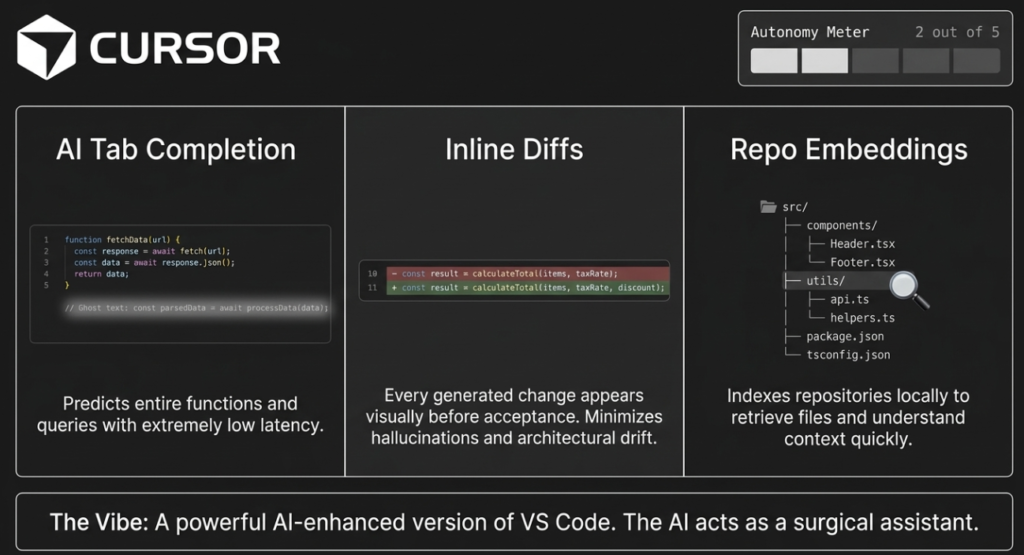
You manually edit files while AI provides
- Tab autocomplete
- Inline diffs
- Context-aware prompts
- Side-panel conversations
- Semantic code retrieval
The AI acts like a surgical assistant rather than an autonomous system.
This is why many professional developers prefer Cursor for daily production coding.
Claude Code Workflow
Claude Code operates almost entirely through the terminal.
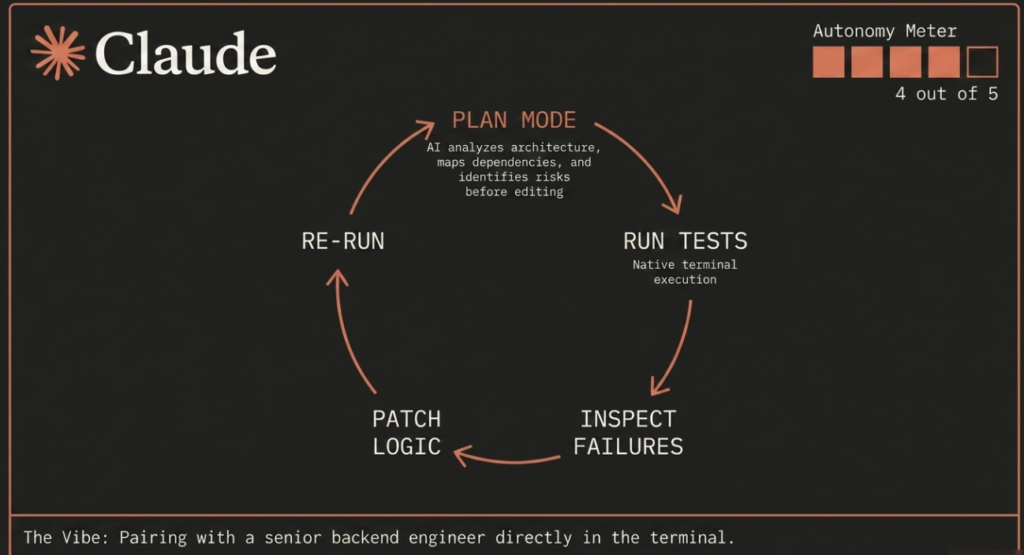
Instead of clicking through files visually, you describe problems conversationally.
Example workflow
- Explain architectural goals
- Ask for multi-file refactors
- Run debugging sessions
- Execute tests
- Analyze failures
- Refine logic iteratively
Claude Code excels when engineering reasoning matters more than visual editing.
Antigravity Workflow
Antigravity changes the relationship completely.
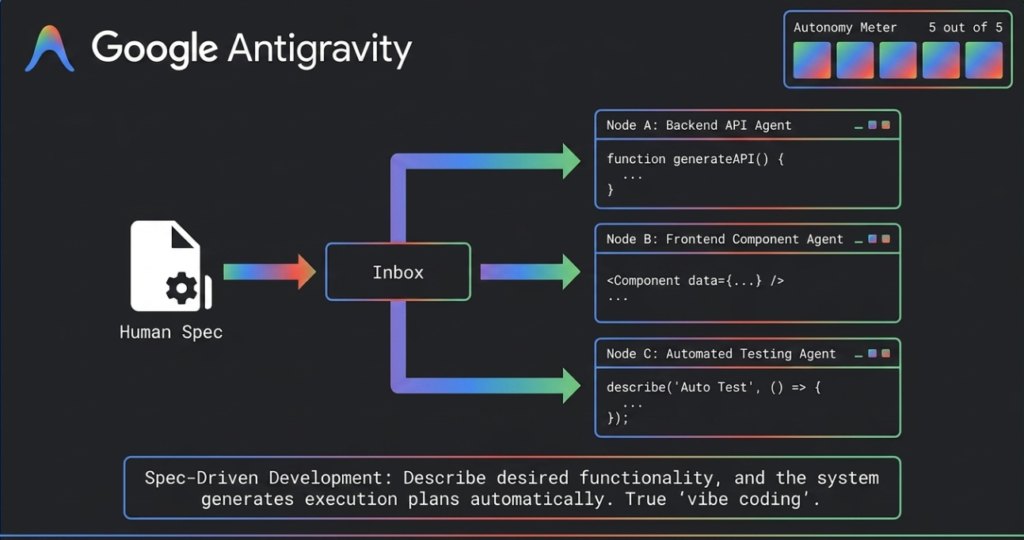
Instead of asking AI to help you code, you ask AI to build systems.
The platform automatically
- Creates implementation plans
- Spawns specialized agents
- Runs servers
- Launches browsers
- Tests interfaces
- Fixes runtime issues
- Generates screenshots
- Records artifacts
This makes Antigravity extremely powerful for rapid prototyping and MVP generation.
High-Level Feature Comparison
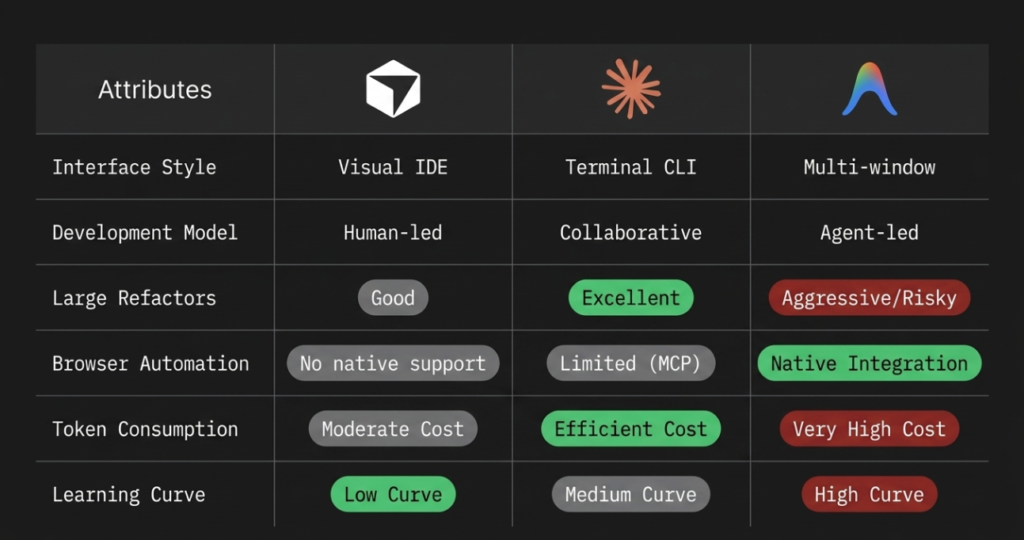
| Feature | Cursor | Claude Code | Google Antigravity |
|---|---|---|---|
| Interface Style | Visual IDE | Terminal CLI | Multi-window autonomous workspace |
| Development Model | Human-led | Collaborative | Agent-led |
| AI Interaction | Inline edits and chat | Conversational reasoning | Background autonomous agents |
| Browser Automation | No native support | Limited through MCP | Native integrated browser testing |
| Runtime Testing | Manual | Native terminal execution | Full autonomous verification |
| Architecture Planning | Moderate | Excellent | Excellent |
| Large Refactors | Good | Excellent | Aggressive but risky |
| Token Consumption | Moderate | Efficient | Very high |
| Learning Curve | Low | Medium | High |
| Best Use Case | Daily coding | Complex reasoning | Rapid autonomous development |
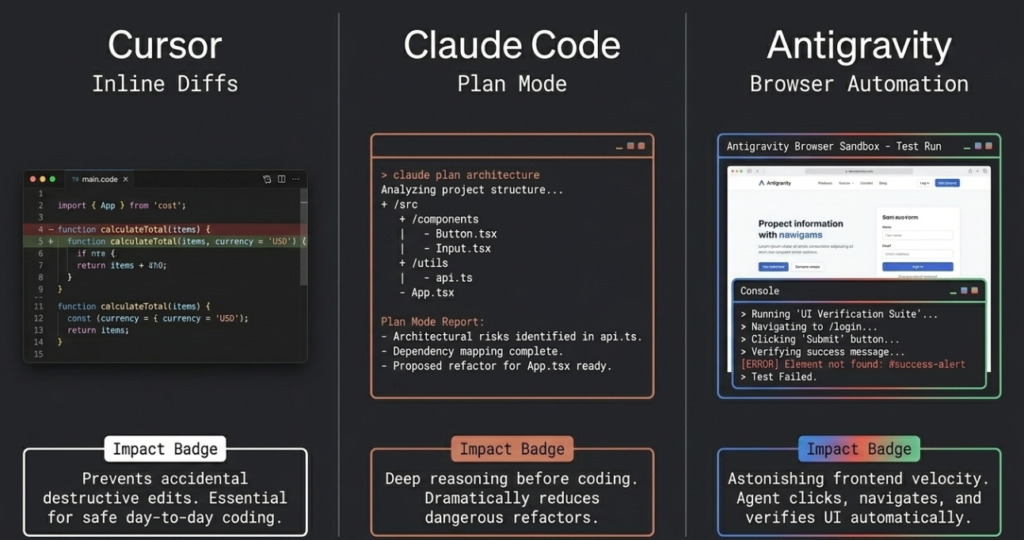
Cursor Deep Dive
What Makes Cursor Popular
Cursor became one of the most adopted AI coding platforms because it improves existing workflows instead of replacing them.
Developers already comfortable with Visual Studio Code can start using Cursor almost immediately.
The interface remains familiar while adding advanced AI capabilities.
Key Cursor Features
AI Tab Completion
Cursor predicts entire functions, loops, queries, and class structures with extremely low latency.
This creates a fluid coding experience similar to traditional autocomplete but dramatically more intelligent.
Inline Diffs
Every generated change appears visually before acceptance.
This is one of Cursor’s biggest strengths because developers retain complete control over modifications.
It minimizes hallucinations and unwanted architectural drift.
Repository Embeddings
Cursor indexes your repository locally using semantic embeddings.
This allows it to retrieve relevant files and understand project context quickly.
However, very large repositories spanning dozens of interconnected services can reduce coherence.
Multi-Model Ecosystem
Cursor supports multiple AI providers including
- Anthropic Claude models
- OpenAI GPT models
- Google Gemini
- Custom OpenAI-compatible endpoints
This flexibility is extremely valuable for teams with different infrastructure requirements.
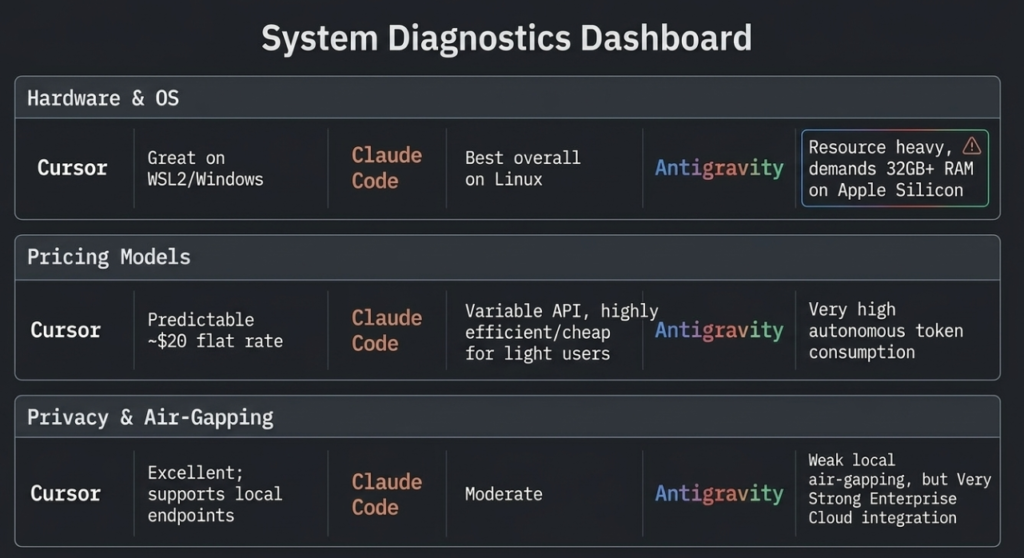
Cursor Advantages
| Advantage | Why It Matters |
|---|---|
| Familiar interface | Minimal learning curve |
| Strong autocomplete | Excellent daily productivity |
| Safe inline review | Prevents accidental destructive edits |
| Strong extension ecosystem | Full VS Code compatibility |
| Predictable monthly pricing | Easier budgeting |
| Great TypeScript support | Excellent frontend workflow |
Cursor Weaknesses
| Weakness | Impact |
|---|---|
| Limited autonomy | Requires constant supervision |
| Manual testing workflow | Human must verify outputs |
| Weaker multi-file reasoning | Can lose cohesion in huge repos |
| Less capable architectural planning | Not ideal for major refactors |
Best Developers for Cursor
Cursor is ideal for
- Frontend developers
- Full-stack engineers
- TypeScript developers
- React teams
- Daily production coding
- Enterprise developers needing visual oversight
If you want AI assistance without surrendering control, Cursor is probably the best choice.
Claude Code Deep Dive
What Makes Claude Code Different
Anthropic designed Claude Code around reasoning instead of editing.
The system behaves more like a collaborative engineer than an autocomplete engine.
Its strength comes from structured thinking, planning, debugging, and system-level understanding.
Terminal-First Philosophy
Claude Code lives inside the command line.
This appeals strongly to developers using
- Terminal-centric workflows
- Neovim
- Tmux
- Bash
- Zsh
- Linux development environments
It eliminates graphical overhead and enables rapid keyboard-driven workflows.
Plan Mode
One of Claude Code’s defining capabilities is Plan Mode.
Before editing files, the AI can
- Analyze architecture
- Map dependencies
- Identify risks
- Ask clarifying questions
- Explain implementation strategies
This dramatically reduces dangerous refactors.
Native Test Execution
Claude Code can execute terminal commands directly.
This allows iterative debugging loops
- Run tests
- Inspect failures
- Analyze stack traces
- Patch logic
- Re-run tests
This workflow feels remarkably similar to working with a senior engineer.
Claude Code Advantages
| Advantage | Why It Matters |
|---|---|
| Exceptional reasoning | Better architectural decisions |
| Strong debugging | Excellent backend reliability |
| Terminal-native workflow | Extremely fast for advanced users |
| Efficient token usage | Lower long-term cost |
| Excellent legacy refactors | Safer large-scale modifications |
Claude Code Weaknesses
| Weakness | Impact |
|---|---|
| Higher learning curve | Requires terminal comfort |
| Minimal visual UI | Less beginner-friendly |
| Limited browser automation | Weak frontend verification |
| Less visual diffing | Harder for GUI-first developers |
Best Developers for Claude Code
Claude Code is ideal for
- Backend engineers
- Python developers
- DevOps engineers
- Linux power users
- Legacy system maintainers
- Architects handling complex systems
If you spend most of your time inside the terminal already, Claude Code may feel revolutionary.
Google Antigravity Deep Dive
What Is Antigravity
Google DeepMind created Antigravity as a fully agentic development environment.
Instead of AI-assisted editing, Antigravity emphasizes autonomous software execution.
This is the most futuristic platform among the three.
Multi-Agent Architecture
Antigravity can launch multiple specialized agents simultaneously.
Example
- One agent writes backend APIs
- Another builds frontend components
- Another runs tests
- Another debugs browser interactions
All progress streams into a central inbox.
This massively increases development speed.
Browser Agent Automation
This is Antigravity’s killer feature.
The platform includes a sandboxed browser environment capable of
- Launching applications
- Clicking UI elements
- Navigating flows
- Reading console errors
- Capturing screenshots
- Recording videos
- Verifying visual rendering
This dramatically improves frontend automation.
Spec-Driven Development
Instead of editing individual files, Antigravity operates from specifications.
You describe desired functionality and the system generates execution plans automatically.
This enables true “vibe coding.”
Antigravity Advantages
| Advantage | Why It Matters |
|---|---|
| Massive automation | Extremely fast prototyping |
| Browser verification | Excellent frontend testing |
| Multi-agent execution | High parallelism |
| Autonomous workflows | Minimal manual coding |
| Great MVP generation | Fast startup velocity |
Antigravity Weaknesses
| Weakness | Impact |
|---|---|
| High token consumption | Expensive |
| Over-engineering risk | Can create bloated systems |
| Hallucination risk | Requires supervision |
| High learning curve | Complex workflow management |
| Resource intensive | Demands powerful hardware |
Best Developers for Antigravity
Antigravity works best for
- Startup founders
- Rapid prototyping teams
- Product experimentation
- Full-stack MVP creation
- Automated QA pipelines
- Autonomous engineering workflows
If speed matters more than perfect precision, Antigravity is incredibly powerful.
Which Tool Is Best for Different Programming Languages
Web Development
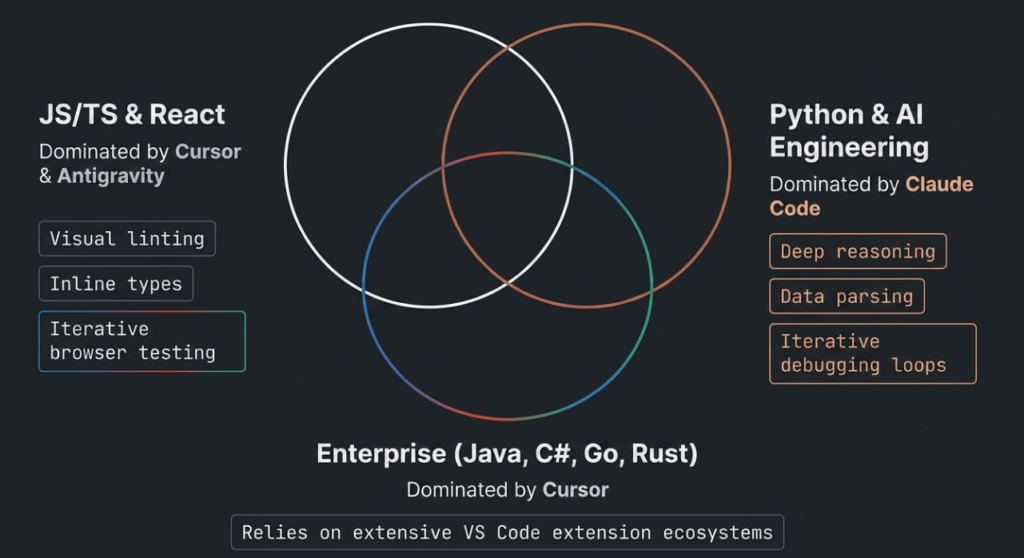
Best Stack for JavaScript and TypeScript
| Platform | Recommendation Level |
|---|---|
| Cursor | Excellent |
| Antigravity | Excellent |
| Claude Code | Good |
Why Cursor Excels
TypeScript development benefits enormously from
- Visual linting
- Inline type feedback
- Fast autocomplete
- IDE navigation
Cursor handles these workflows beautifully.
Why Antigravity Excels
React applications often require iterative browser testing.
Antigravity’s integrated browser agent can
- Launch apps
- Navigate interfaces
- Detect styling bugs
- Fix console issues
This creates astonishing frontend velocity.
Python and AI Engineering
| Platform | Recommendation Level |
|---|---|
| Claude Code | Excellent |
| Cursor | Excellent |
| Antigravity | Good |
Claude Code shines for Python because backend engineering often requires
- Deep reasoning
- Terminal testing
- Data parsing
- Iterative debugging
- Test-driven development
Its execution loops are extremely effective for backend correctness.
Enterprise Languages
Java, C#, Go, and Rust
| Platform | Recommendation Level |
|---|---|
| Cursor | Excellent |
| Claude Code | Good |
| Antigravity | Moderate |
Cursor’s compatibility with enterprise-grade language tooling makes it especially strong for
- Java
- .NET
- Rust
- Go
Large extension ecosystems remain critical in enterprise development.
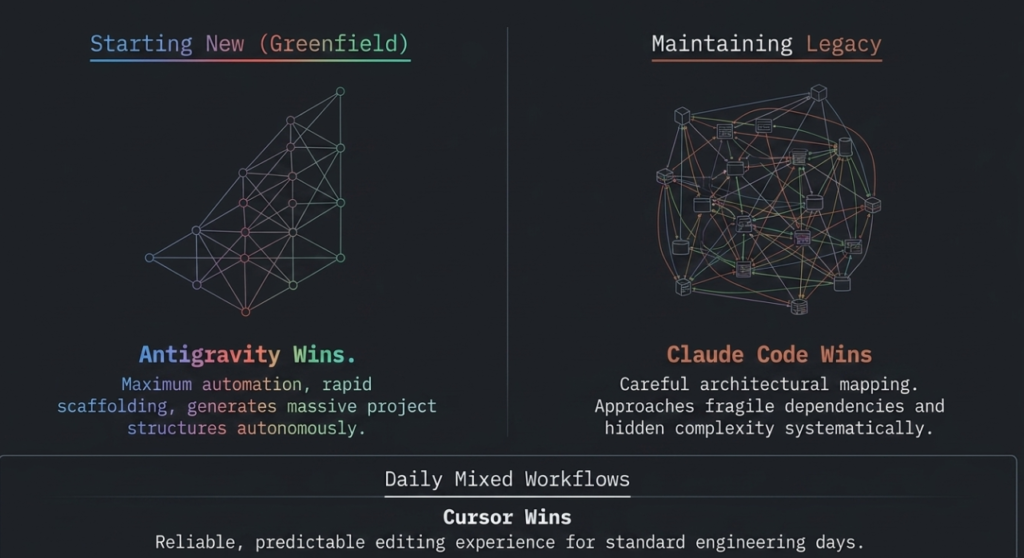
Greenfield vs Legacy Projects
This is one of the most important distinctions.
Starting a New Project
| Best Choice | Why |
|---|---|
| Antigravity | Maximum automation and rapid scaffolding |
Antigravity dominates greenfield development because it can generate massive project structures autonomously.
Maintaining Legacy Systems
| Best Choice | Why |
|---|---|
| Claude Code | Careful reasoning and architectural mapping |
Legacy codebases contain fragile dependencies and hidden complexity.
Claude Code approaches them cautiously and systematically.
Daily Mixed Workflows
| Best Choice | Why |
|---|---|
| Cursor | Reliable and predictable editing experience |
Cursor excels in normal day-to-day engineering.
UI Preference Matters More Than You Think
GUI Developers
If you love
- File trees
- Side-by-side diffs
- Visual tabs
- Git staging panels
You will probably prefer Cursor or Antigravity.
Terminal Developers
If you love
- Neovim
- Tmux
- Keyboard workflows
- Minimal interfaces
Claude Code is likely the strongest fit.
Hardware Recommendations
Apple Silicon Macs
| Tool | Performance |
|---|---|
| Cursor | Excellent |
| Claude Code | Excellent |
| Antigravity | Heavy RAM usage |
Antigravity ideally needs at least 32GB RAM on Apple Silicon systems.
Linux Environments
| Tool | Recommendation |
|---|---|
| Claude Code | Best overall |
| Cursor | Good |
| Antigravity | Variable |
Linux terminal workflows strongly favor Claude Code.
Windows and WSL2
| Tool | Best Configuration |
|---|---|
| Cursor | Windows UI + WSL2 backend |
| Claude Code | Native WSL2 installation |
| Antigravity | Native Windows preferred |
Cursor’s Remote WSL workflow is particularly polished.
Pricing and Cost Analysis
Cursor Pricing
| Plan | Approximate Cost |
|---|---|
| Free Tier | Limited |
| Cursor Pro | Around $20 monthly |
Cursor offers one of the most predictable pricing models.
Heavy users appreciate flat-rate billing.
Claude Code Pricing
Claude Code generally relies on API-based consumption through Anthropic Console.
Costs vary significantly depending on usage intensity.
Light users can often stay below $10 monthly.
Antigravity Pricing
Antigravity is the most expensive option.
Autonomous agents continuously consume tokens while
- Reading files
- Running tests
- Launching browsers
- Retrying fixes
- Generating artifacts
This is better suited for teams with enterprise budgets.
Security and Privacy Comparison
Local Development and Air-Gapped Systems
| Platform | Suitability |
|---|---|
| Cursor | Excellent |
| Claude Code | Moderate |
| Antigravity | Weak |
Cursor supports locally hosted models through OpenAI-compatible endpoints.
This is critical for privacy-sensitive development environments.
Enterprise Environments
| Platform | Enterprise Readiness |
|---|---|
| Cursor Enterprise | Strong |
| Claude Code | Strong |
| Antigravity Enterprise | Very Strong |
Antigravity integrates tightly with enterprise cloud ecosystems including Google Cloud infrastructure.
Real-World Workflow Recommendations
Best Setup for Most Developers
Recommended Combination
| Task | Recommended Tool |
|---|---|
| Daily coding | Cursor |
| Deep debugging | Claude Code |
| Rapid prototyping | Antigravity |
Many advanced engineering teams use all three platforms together.
Ideal Developer Profiles
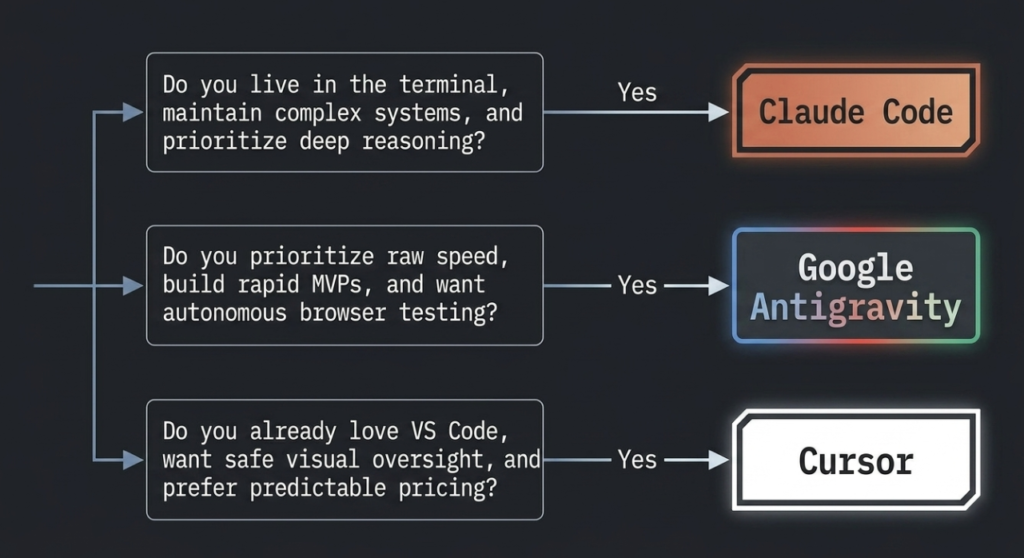
Choose Cursor If
- You already love VS Code
- You want safe AI assistance
- You value visual oversight
- You code daily in TypeScript or React
- You prefer predictable pricing
Choose Claude Code If
- You live inside the terminal
- You maintain complex systems
- You prioritize reasoning quality
- You work heavily with Python
- You prefer conversational engineering
Choose Antigravity If
- You want autonomous development
- You build MVPs rapidly
- You need browser automation
- You value speed over precision
- You are comfortable supervising agents
Final Comparison Matrix
| Scenario | Best Platform |
|---|---|
| Daily professional coding | Cursor |
| Deep debugging sessions | Claude Code |
| Autonomous app generation | Antigravity |
| React frontend development | Antigravity or Cursor |
| Python backend systems | Claude Code |
| Enterprise C# and Java | Cursor |
| Linux terminal workflows | Claude Code |
| Fast MVP creation | Antigravity |
| Lowest predictable cost | Cursor |
| Lowest lightweight usage cost | Claude Code |
| Highest automation level | Antigravity |
Final Verdict
As of May 2026, all three platforms dominate different areas of AI-assisted software development.
Cursor remains the best all-around daily driver for most developers because it balances productivity, safety, speed, and familiarity.
Claude Code by Anthropic delivers the strongest reasoning and debugging capabilities, especially for backend engineering and complex architectural refactoring.
Google DeepMind Antigravity represents the future of autonomous software development with multi-agent execution, browser automation, and spec-driven workflows.
The best choice depends entirely on your engineering style.
If you want AI assistance while staying fully in control, choose Cursor.
If you want a deeply intelligent engineering collaborator, choose Claude Code.
If you want AI to behave like an autonomous software engineer, choose Antigravity.
