Freelancers, agencies, consultants, startups, and small businesses all face the same challenge. You need contracts that protect your work, secure payments, define project scope, and prevent misunderstandings before they happen.
The problem is that traditional legal processes are often slow, expensive, and overwhelming. Hiring a lawyer for every freelance project or client agreement simply is not realistic for most independent professionals and growing businesses.
That is why online contract generators have become essential business tools in 2026.

Modern contract platforms do far more than create legal documents. They automate invoices, track signatures, manage proposals, organize workflows, connect with CRMs, and even provide legal assistance. Some are designed specifically for freelancers, while others focus on enterprise security and automation.
Here you will get the 10 best online contract generators for businesses and freelancers. You will learn which platform works best for creative professionals, which tools provide strong legal protection, and which solutions are ideal for scaling teams and agencies.
Whether you are a freelancer managing a few clients or a growing company handling dozens of agreements each month, this article will help you choose the right contract generator for your workflow.
Why Online Contract Generators Matter
A professional contract is more than paperwork. It is the foundation of a secure business relationship.
Strong contracts help businesses.
- Protect intellectual property
- Prevent scope creep
- Reduce payment disputes
- Clarify deliverables and deadlines
- Improve professionalism
- Build client trust
- Automate payment workflows
For freelancers and agencies, contracts also create a smoother onboarding process. Clients are more likely to trust businesses that provide polished agreements and simple digital signing experiences.
Today’s contract generators make the entire process easier by allowing users to.
- Use pre built templates
- Send contracts online
- Collect legally binding signatures
- Automate invoices and reminders
- Track client engagement
- Store agreements securely
The right platform can save hours of administrative work every month while also protecting your business legally and financially.
What to Look for in an Online Contract Generator
Before choosing a platform, it is important to understand which features matter most for your business model.
Legally Reviewed Templates
Professionally written templates reduce risk and help ensure your agreements include important protections.
Electronic Signature Support
A modern contract platform should support legally binding electronic signatures with a smooth client experience.
Workflow Automation
Automation can reduce repetitive tasks like invoice creation, payment reminders, and follow ups.
Proposal Integration
If you regularly pitch clients, proposal and contract integration can dramatically improve conversion rates.
CRM and Payment Integrations
Businesses benefit from platforms that connect with invoicing systems, payment processors, and customer relationship management tools.
Analytics and Tracking
Some platforms allow you to see when clients open, review, or hesitate on certain contract sections.
Mobile Accessibility
Freelancers and agencies often need to manage contracts while traveling or meeting clients in person.
Here are 10 Online Contract Generators for Business and Freelancers
1. Hello Bonsai
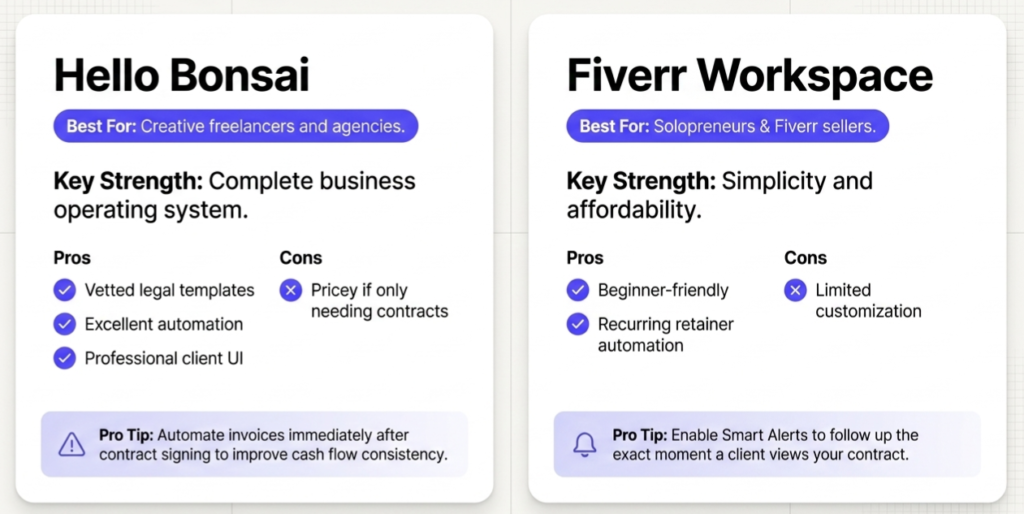
Best For Creative freelancers and agencies needing a full business operating system.
Official Website
Hello Bonsai
Overview
Hello Bonsai is one of the most popular freelance business management platforms available today. It combines contracts, invoicing, proposals, tax tracking, project management, and client CRM tools into one clean dashboard.
Instead of juggling multiple applications, freelancers can manage their entire workflow inside a single platform. This makes Bonsai especially valuable for creative professionals who want simplicity without sacrificing professionalism.
The platform is particularly strong for designers, writers, developers, consultants, and boutique agencies.
How to Use Hello Bonsai for Better Results
One of the smartest ways to use Bonsai is by automating invoices immediately after a contract is signed. This reduces payment delays and improves cash flow consistency.
Freelancers should also use Bonsai’s vetted templates instead of building contracts from scratch. These templates are designed specifically for freelance businesses and include protections related to intellectual property rights, revision limits, and kill fees.
Pros
- Complete business ecosystem for freelancers
- Excellent automation tools
- Modern and professional client experience
- Freelancer specific legal protections
- Easy to use interface
Cons
- More expensive if you only need contracts
- Less suitable for highly customized corporate agreements
Ideal Users
- Freelancers
- Creative agencies
- Consultants
- Independent professionals
2. Fiverr Workspace
Best For Solopreneurs and Fiverr users looking for a simple and affordable contract solution.
Official Website
Fiverr Workspace
Overview
Previously known as AND.CO, Fiverr Workspace focuses on simplicity and usability. It is designed for independent freelancers who want lightweight tools for contracts, invoicing, and payments without unnecessary complexity.
The platform works particularly well for users already operating inside the Fiverr ecosystem.
Its clean interface makes it attractive for beginners who want a fast and affordable way to manage contracts professionally.
How to Use Fiverr Workspace for Better Results
Enable Smart Alerts to receive notifications when clients view your contract. This allows you to follow up while the proposal is still fresh in the client’s mind.
Freelancers with recurring clients should use the subscription feature to automate retainer agreements and recurring invoices.
Pros
- Simple and beginner friendly
- Affordable pricing
- Strong integration with Fiverr
- Includes standard freelance clauses
Cons
- Limited customization options
- Customer support can be slower for free users
Ideal Users
- Beginner freelancers
- Solopreneurs
- Fiverr sellers
- Budget conscious professionals
Hello Bonsai vs Fiverr Workspace
3. Plutio
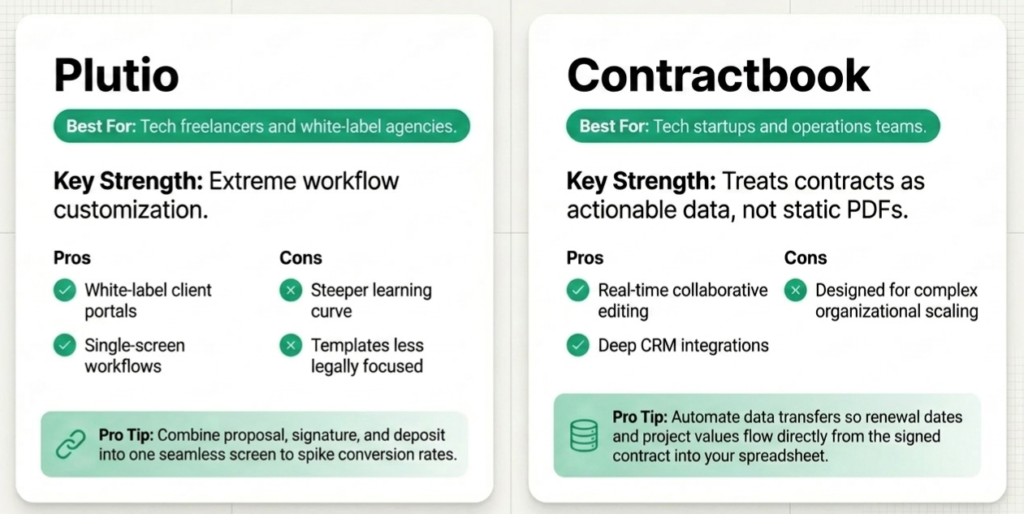
Best For Freelancers and agencies wanting customizable workflows and client portals.
Official Website
Plutio
Overview
Plutio combines proposals, contracts, invoices, tasks, messaging, and client collaboration into one flexible platform.
Its biggest advantage is customization. Unlike many competitors, Plutio allows users to create highly personalized workflows and white label client experiences.
This flexibility makes it especially attractive for agencies and freelancers who want more control over branding and automation.
How to Use Plutio for Better Results
Create a single screen workflow where clients can review a proposal, sign the contract, and pay the deposit in one smooth process. Reducing friction often improves conversion rates significantly.
Businesses should also use Plutio’s client portal feature to give clients ongoing access to agreements, project updates, and deliverables.
Pros
- Extremely customizable
- Strong client portal system
- White label options available
- Combines multiple business tools
Cons
- Steeper learning curve
- Templates are less legally focused than some competitors
Ideal Users
- Agencies
- White label service providers
- Tech freelancers
- Workflow focused businesses
4. Contractbook
Best For Businesses focused on contract automation and operational workflows.
Official Website
Contractbook
Overview
Contractbook approaches agreements differently by treating contracts as structured business data rather than static PDF files.
This allows businesses to automate workflows after contracts are signed, making the platform especially powerful for growing companies and operations teams.
It integrates smoothly with CRMs, spreadsheets, and internal systems.
How to Use Contractbook for Better Results
Automate data transfers so that contract information like payment values, renewal dates, and project start dates automatically flows into your CRM or spreadsheets.
Use the collaborative editor to negotiate contracts directly with clients in real time instead of emailing multiple versions back and forth.
Pros
- Excellent workflow automation
- Converts contracts into actionable data
- Strong collaboration tools
- Great for scaling operations
Cons
- Better suited for SMBs than solo freelancers
- Initial setup requires time
Ideal Users
- Tech startups
- SaaS companies
- Operations teams
- Automation focused businesses
Plutio vs Contractbook
5. PandaDoc
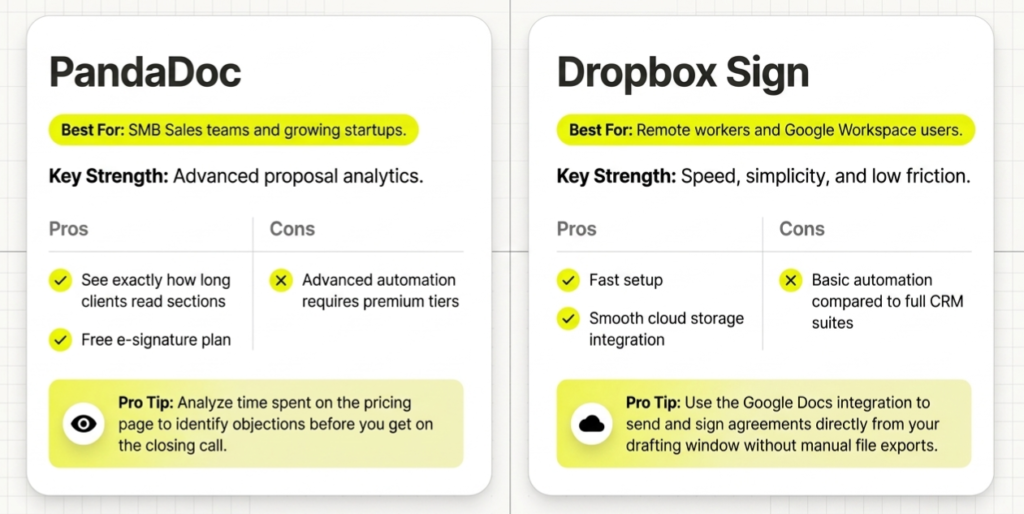
Best For Small businesses and sales teams needing proposal analytics and automation.
Official Website
PandaDoc
Overview
PandaDoc is far more than a basic contract generator. It combines proposals, pricing tables, content libraries, workflow automation, and advanced analytics into one powerful platform.
Sales teams particularly value PandaDoc because it provides visibility into how clients interact with proposals and agreements.
This insight can improve follow ups and increase conversion rates.
How to Use PandaDoc for Better Results
Create reusable content blocks for standard clauses like confidentiality agreements and payment terms. This allows teams to build contracts much faster.
Use PandaDoc analytics to see how long clients spend reviewing specific sections like pricing or deliverables. This data can help identify objections before closing the deal.
Pros
- Powerful analytics tools
- Excellent proposal builder
- Supports images and videos
- Free e signature plan available
Cons
- Advanced automation requires higher plans
- Can feel excessive for simple contracts
Ideal Users
- Sales teams
- Marketing agencies
- SaaS companies
- Growing startups
6. Dropbox Sign
Best For Freelancers needing simple and affordable electronic signatures.
Official Website
Dropbox Sign
Overview
Formerly known as HelloSign, Dropbox Sign focuses on simplicity and ease of use.
It is ideal for freelancers and small businesses that already have contracts prepared and simply need a fast, legally binding signature solution.
Its integrations with Google Docs, Google Drive, and Dropbox make it especially convenient for remote workflows.
How to Use Dropbox Sign for Better Results
Install the Google Docs integration so you can sign and send agreements directly from Google Docs without exporting files manually.
This simplifies workflows and saves time.
Pros
- Easy to use
- Affordable pricing
- Smooth cloud storage integrations
- Faster setup than enterprise tools
Cons
- Limited analytics features
- Minimal editing functionality
Ideal Users
- Freelancers
- Consultants
- Small businesses
- Google Workspace users
PandaDoc vs Dropbox Sign
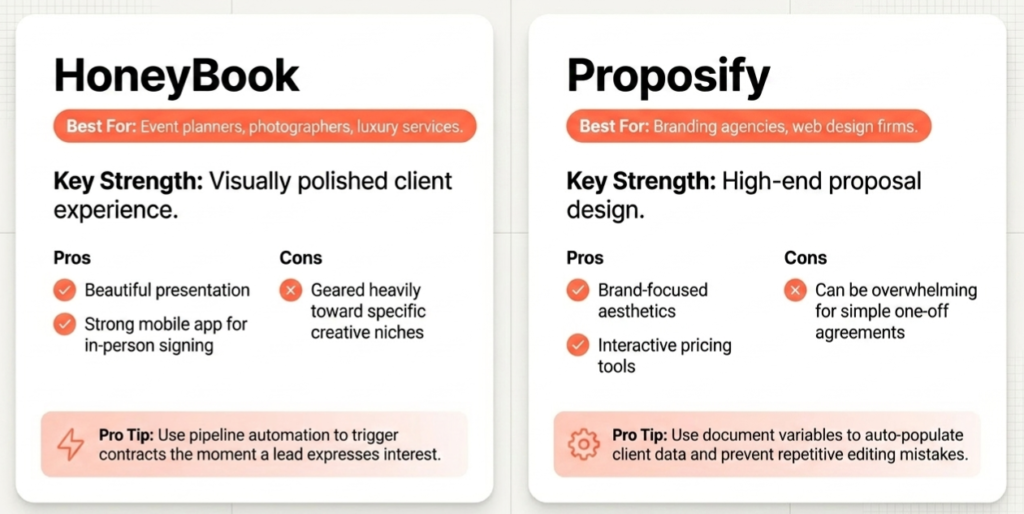
7. HoneyBook
Best For Event planners, photographers, and creative professionals.
Official Website
HoneyBook
Overview
HoneyBook is built around the client experience. The platform focuses heavily on branding, presentation, and workflow automation.
Creative professionals love HoneyBook because it helps them present proposals and contracts in a visually polished way that feels premium and professional.
The platform combines contracts, proposals, invoices, scheduling, and lead pipelines into one streamlined system.
How to Use HoneyBook for Better Results
Use HoneyBook’s pipeline automation tools to trigger contracts automatically when a lead expresses interest. Faster response times often lead to higher booking rates.
The mobile app is another major advantage. Freelancers can collect signatures directly from their phone during in person consultations or meetings.
Pros
- Beautiful client presentation
- Excellent automation features
- Strong mobile experience
- Great for creative businesses
Cons
- Project based workflow may feel restrictive
- Payment processing fees can apply
Ideal Users
- Wedding photographers
- Event planners
- Creative consultants
- Luxury service providers
8. Proposify
Best For Design focused agencies where presentation quality matters.
Official Website
Proposify
Overview
Proposify focuses heavily on design and presentation. The platform helps agencies create visually stunning proposals and contracts that feel more like polished brand presentations than standard legal documents.
For businesses where aesthetics influence sales, Proposify can significantly improve the client experience.
How to Use Proposify for Better Results
Use variables to automatically populate client information throughout the document. This reduces repetitive editing and minimizes mistakes.
Interactive pricing tables are another powerful feature. Clients can choose optional services directly inside the proposal, automatically updating the total value.
Pros
- Beautiful proposal design
- Strong personalization features
- Interactive pricing tools
Cons
- Editor can sometimes feel slower
- Focuses more on proposals than legal complexity
Ideal Users
- Branding agencies
- Creative studios
- Marketing firms
- Web design companies
HoneyBook vs Propsify
9. Rocket Lawyer
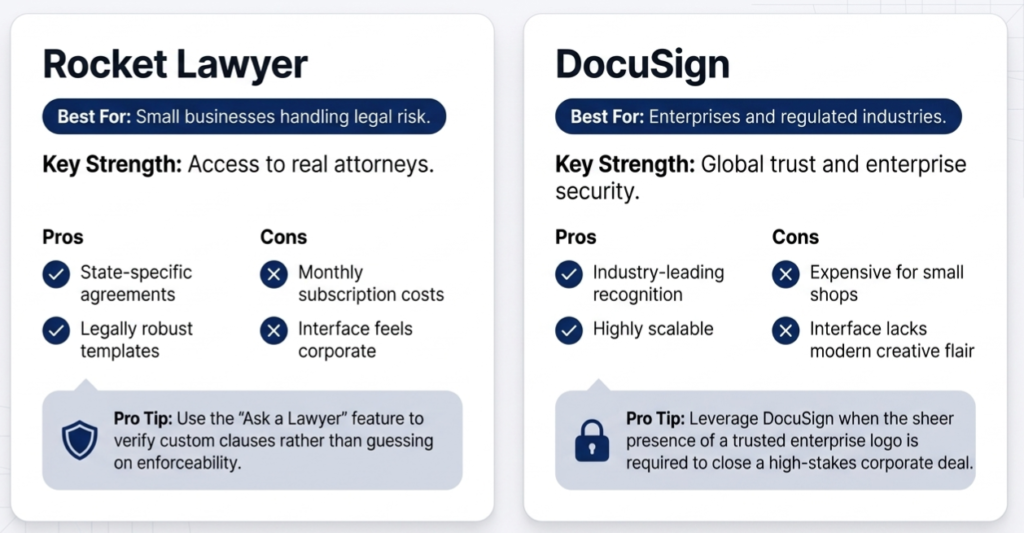
Best For Businesses needing legal support and attorney access.
Official Website
Rocket Lawyer
Overview
Rocket Lawyer stands apart because it combines document generation with actual legal assistance.
The platform is ideal for businesses that prioritize legal compliance and enforceability. Users can create agreements while also consulting attorneys when needed.
For freelancers and businesses worried about legal disputes, this extra layer of protection can be extremely valuable.
How to Use Rocket Lawyer for Better Results
Use the Document Defense feature if a client disputes an agreement created through the platform.
Businesses should also take advantage of the Ask a Lawyer feature instead of guessing whether custom clauses are enforceable.
Pros
- Access to licensed attorneys
- Legally robust templates
- State specific agreements
- Strong legal credibility
Cons
- Monthly subscription can be expensive
- Interface feels less modern
Ideal Users
- Small businesses
- Consultants
- Compliance focused companies
- Businesses handling legal risk
10. DocuSign
Best For Enterprises and businesses prioritizing trust, security, and compliance.
Official Website
DocuSign
Overview
DocuSign is the most recognized electronic signature platform in the world. For many businesses, using DocuSign instantly signals professionalism and trust.
The platform offers enterprise grade security, authentication, and compliance features that make it suitable for large organizations and regulated industries.
How to Use DocuSign for Better Results
Create reusable PowerForms for agreements like NDAs and onboarding documents. This allows clients to initiate the signing process themselves through a simple link.
Pros
- Industry leading trust and recognition
- Enterprise level security
- Strong compliance features
- Highly scalable
Cons
- Expensive for small businesses
- Interface feels more corporate than modern competitors
Ideal Users
- Enterprises
- Legal departments
- Financial organizations
- Compliance heavy businesses
Rocket Lawyer vs DocuSign
Comparison Table for the Best Online Contract Generators
| Platform | Best For | Key Strength | Free Plan | Learning Curve | Automation | Legal Strength |
|---|---|---|---|---|---|---|
| Hello Bonsai | Freelancers | Full business suite | Trial | Medium | Excellent | Good |
| Fiverr Workspace | Solopreneurs | Simplicity | Limited | Low | Moderate | Standard |
| Plutio | Agencies | Customization | Trial | High | Excellent | Moderate |
| HoneyBook | Creatives | Client experience | Trial | Medium | Excellent | Standard |
| PandaDoc | SMB sales | Analytics | Yes | Medium | Excellent | Good |
| Proposify | Agencies | Proposal design | No | High | Moderate | Moderate |
| Rocket Lawyer | Legal needs | Attorney access | Trial | Low | Low | Excellent |
| Contractbook | Automation | Workflow data | No | High | Excellent | Excellent |
| DocuSign | Enterprise | Security | Trial | Low | Strong | Excellent |
| Dropbox Sign | Freelancers | Simplicity | Trial | Low | Basic | Good |
How to Choose the Right Contract Generator
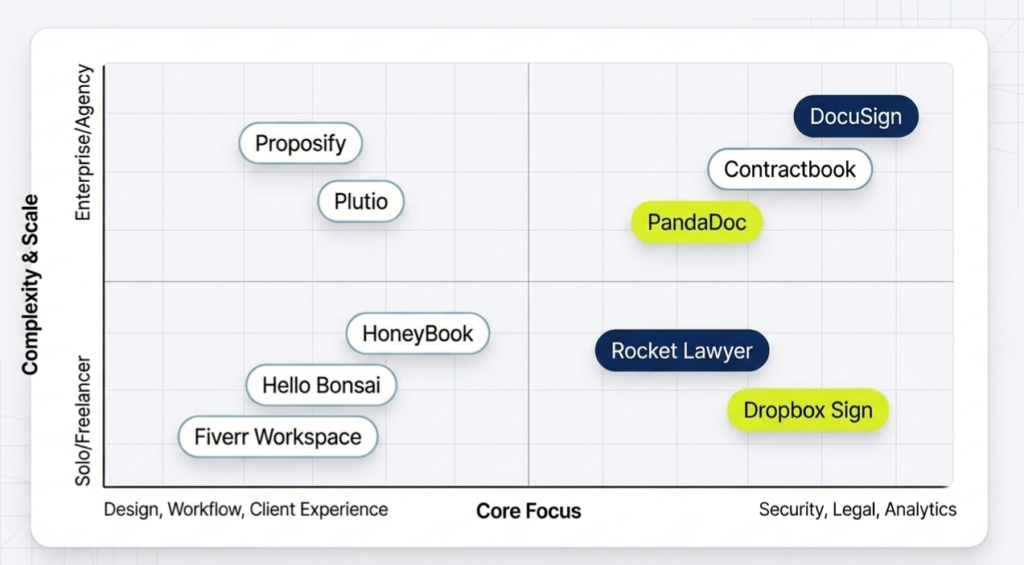
Choosing the right platform depends on your workflow, budget, and business priorities.
If you want an all in one freelance management system, Hello Bonsai is one of the strongest options available.
If you prioritize affordability and simplicity, Fiverr Workspace provides excellent value for solo freelancers.
Businesses focused on proposal optimization and sales analytics should strongly consider PandaDoc.
Creative agencies that care about visual presentation may prefer Proposify or HoneyBook.
For companies needing serious legal reliability and attorney support, Rocket Lawyer stands out as one of the safest choices.
Meanwhile, enterprises and regulated industries often choose DocuSign because of its global trust and security reputation.
Common Contract Mistakes Freelancers and Businesses Should Avoid
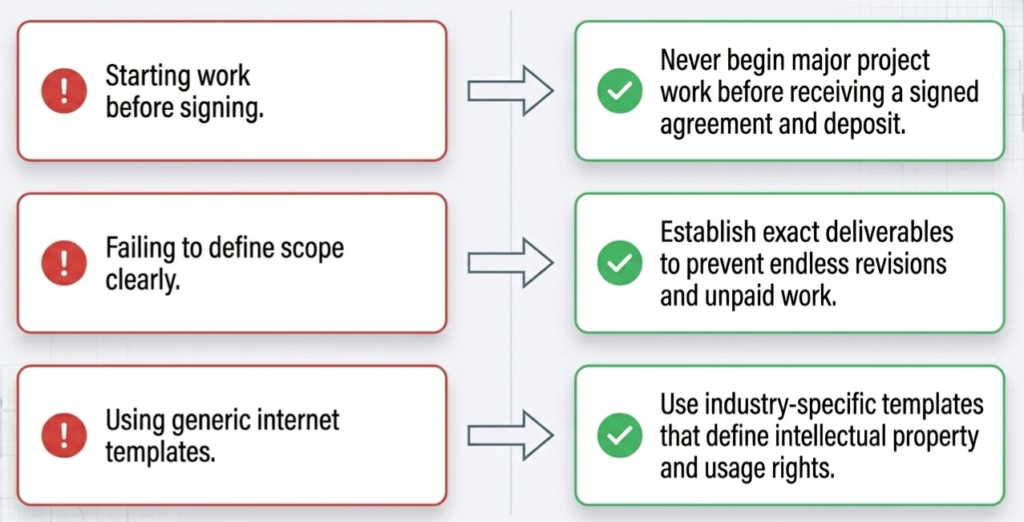
Even with powerful software, businesses still make critical contract mistakes.
Starting Work Before Signing
Never begin major project work before receiving a signed agreement.
Ignoring Intellectual Property Clauses
Creative professionals should clearly define ownership rights and usage permissions.
Using Generic Templates
Industry specific templates provide much stronger protection than generic agreements.
Failing to Define Scope Clearly
Undefined scope often leads to endless revisions and unpaid work.
Avoiding Milestone Payments
Large projects should include staged payments to reduce financial risk.
How do these platforms help freelancers avoid common business risks
Online contract platforms help freelancers mitigate common business risks by providing structured, legally sound agreements and automated workflows. Specifically, they protect freelancers in the following ways.
Providing Legally Reviewed Templates. Instead of using generic documents, freelancers can use professionally written, industry-specific templates that inherently reduce legal risk. These templates often include crucial protections regarding intellectual property ownership, kill fees, and revision limits.
Preventing Scope Creep. By clearly defining deliverables, timelines, and project scope within the contract, these platforms prevent misunderstandings that often lead to endless revisions and unpaid work.
Securing and Automating Payments. Contract generators help reduce payment disputes by integrating invoices directly with the agreement. For example, platforms allow you to automate invoices immediately after a contract is signed to maintain consistent cash flow, and they support staged milestone payments to lower your financial risk on large projects.
Ensuring Legal Enforceability. Platforms provide legally binding electronic signatures to ensure contracts are valid before any major work begins. Some options, such as Rocket Lawyer, take this a step further by offering a Document Defense feature if a client disputes an agreement, alongside access to licensed attorneys to verify that custom clauses are actually enforceable.
Maintaining Security and Compliance. For businesses managing highly sensitive data or operating in regulated industries, platforms like DocuSign offer enterprise-grade security, authentication, and compliance features to ensure agreements are safe and trustworthy
Final Thoughts
Online contract generators have become essential tools for freelancers, agencies, consultants, and businesses of every size.
The right platform can save time, reduce legal risks, improve professionalism, and streamline your workflow from proposal to payment.
For freelancers wanting a complete business management system, Hello Bonsai remains one of the strongest all around choices.
For legal protection and attorney backed support, Rocket Lawyer offers outstanding value.
Businesses focused on proposals and analytics will benefit greatly from PandaDoc, while enterprises needing trusted compliance solutions may prefer DocuSign.
Ultimately, the best contract generator is the one that fits naturally into your workflow while protecting your business and helping you scale more efficiently.
