Portable Thermal Label Printer: A Smarter Way to Ship Orders for Your Online Business
If you sell products online through Amazon, Etsy, Shopify, or your own ecommerce website, shipping is one of those daily tasks that can quietly eat up a lot of time.
You receive an order, download the shipping label, open a regular printer, check the paper, print the label, cut it out, attach it to the package, and then move on to the next order. When you only have one or two packages, this is manageable. When you have dozens of orders waiting to be shipped, it quickly becomes frustrating.
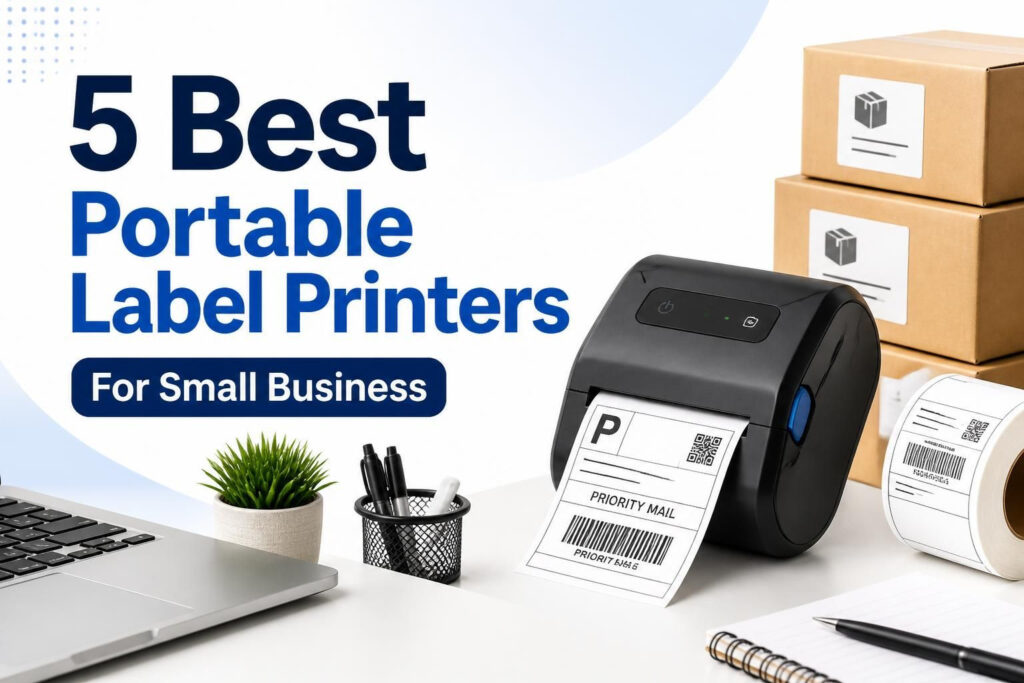
This is where a portable thermal label printer can make a noticeable difference.
A compact thermal label printer is designed to print shipping labels without ink or toner. Many models support standard 4×6 shipping labels and connect through Bluetooth or USB, allowing small business owners to print from a phone, tablet, Mac, or Windows computer.
For a small ecommerce business, the biggest benefit is not simply having a smaller printer. It is creating a faster, cleaner, and more organized shipping process.
What Is a Portable Thermal Label Printer?
A portable thermal label printer is a compact printer designed to produce labels using heat-sensitive label material rather than traditional ink or toner.
For ecommerce sellers, the most useful type is a 4×6 thermal shipping label printer. The 4×6 format is widely used for shipping labels, making it convenient for orders handled through marketplaces, ecommerce platforms, and shipping services.
Because thermal printing does not require ink cartridges or toner, there are fewer consumables to manage. You simply load compatible thermal labels, connect the printer, and print.
Many current models also support wireless connections. That means you can potentially print an order label from your iPhone or Android phone without having your computer sitting beside your packing table.
Why Small Online Businesses Should Use a Thermal Label Printer
You do not need a large warehouse or hundreds of daily orders to benefit from a thermal label printer. Even a home-based online store can benefit once shipping becomes a regular part of the business.
1. It Makes Order Fulfillment Faster
Shipping becomes much easier when the label is ready as soon as the order is ready.
Instead of printing a full sheet of paper and cutting out a shipping label, a 4×6 thermal printer can print the label in the format you actually need. You can peel the label and place it directly on the package.
That small change becomes important when you are processing 10, 20, 50, or more orders in a day.
2. You Do Not Need Ink or Toner
One of the biggest differences between a thermal label printer and a traditional inkjet printer is the printing method.
Thermal printers use heat-sensitive labels instead of ink or toner. That means you do not have to worry about an ink cartridge running out in the middle of your shipping routine.
For an online seller, fewer consumables also means fewer things to monitor while preparing orders.
3. It Saves Valuable Desk Space
A traditional printer can take up a significant amount of space, especially if your business operates from a bedroom, home office, small warehouse, or dining table.
A portable thermal label printer is much easier to fit into a small packing station.
You can keep your printer beside your packaging materials, move it when necessary, or create a dedicated shipping corner without needing a large printer table.
4. It Gives Your Shipping Process a More Professional Look
Your customer may never see your packing table, but they will see the package.
A clean, properly printed shipping label looks much more organized than a sheet of paper cut down and attached with excessive tape.
Professional shipping presentation does not replace product quality or customer service, but it can make your overall operation look more established and organized.
5. It Reduces Unnecessary Steps
Small ecommerce businesses often lose time through dozens of tiny tasks.
Finding paper. Checking ink. Cutting labels. Looking for tape. Reprinting labels. Moving documents between devices.
A dedicated thermal label printer removes several of these steps from the shipping workflow.
The result is a smoother process from order received to package handed to the carrier.
How a Portable Thermal Label Printer Works With Your Online Store
The printer does not normally replace Amazon, Etsy, Shopify, or your ecommerce website. Instead, it works alongside your existing order and shipping system.
A typical workflow looks like this:
- Receive an order through Amazon, Etsy, Shopify, or your website.
- Open the order and create or download the shipping label.
- Select the 4×6 label format when required.
- Send the label to your thermal printer through Bluetooth or USB.
- Print the label.
- Peel and attach it to the package.
- Complete the normal carrier drop-off or pickup process.
The important point is that you are not changing your entire ecommerce system. You are improving one of the most repetitive parts of running an online store.
How to Use a Portable Thermal Label Printer
Step 1: Choose the Right Location
Set up the printer close to your packing materials. Ideally, your printer should be within easy reach of your boxes, mailers, tape, scissors, product inventory, and shipping scale.
A simple packing station can save more time than constantly walking between your computer, printer, and storage area.
Step 2: Load 4×6 Thermal Labels
Use compatible thermal shipping labels and make sure they are positioned correctly according to the printer’s instructions.
Before printing a large batch, print a test label. This helps confirm that the label is feeding correctly and that the text and barcode are positioned properly.
Step 3: Connect Your Device
Depending on the model, you may connect through Bluetooth or USB.
Bluetooth can be particularly useful for small businesses that process orders from smartphones or tablets. USB can be convenient when the printer stays permanently connected to a Windows or Mac computer.
Step 4: Print Your Shipping Label
Download the shipping label from your selling platform or shipping service and send it to the printer.
Always check the print preview before producing a large batch. A wrong paper size or scaling setting can cause labels to print incorrectly.
Step 5: Attach the Label to Your Package
Remove the backing if you are using adhesive labels and apply the label to a clean, flat area of the package.
Make sure important information and barcodes are not covered by tape, folds, or other labels.
Why 4×6 Labels Make Sense for Ecommerce Sellers
If your main purpose is shipping orders, a 4×6 thermal label printer is usually more practical than a general-purpose label maker.
The 4×6 format gives you enough space for the shipping address, tracking information, barcodes, and other carrier information while keeping the package label compact.
This is especially useful for sellers shipping products through Amazon, Etsy, Shopify, USPS, UPS, and other shipping workflows.
Before purchasing, however, check the exact label format required by your carrier or shipping software. Printer compatibility does not automatically mean that every label configuration will be identical.
Bluetooth vs USB Thermal Label Printers
Bluetooth is particularly useful if you run your business from a phone or tablet.
For example, an Etsy seller may manage orders from an iPhone and want to print labels without moving to a desktop computer. A Bluetooth printer can make that workflow more convenient.
USB is useful when the printer is permanently positioned beside a computer. It can also be a good backup connection if wireless printing becomes inconvenient.
If you run a small business from multiple devices, choosing a printer that supports both Bluetooth and USB can give you more flexibility.
How a Thermal Label Printer Can Make Your Business Feel More Professional
Running a small online business does not mean your operation has to look small.
A better shipping workflow can improve the way you handle orders, even if you are working from a home office.
Cleaner Packaging
Self-adhesive shipping labels create a cleaner package than printing a large document and attaching part of it with tape.
More Consistent Fulfillment
When every order follows the same printing and packing process, it becomes easier to maintain consistency as your order volume increases.
Less Shipping Desk Clutter
A compact printer, label roll, shipping scale, and packing materials can form a simple dedicated shipping station.
Fewer Interruptions
You can print labels in batches rather than repeatedly stopping your packing process to deal with a full-size printer.
These improvements may seem small individually. Together, they can make order fulfillment feel considerably more organized.
5 Portable Thermal Label Printers Worth Considering
If you are looking for a portable thermal label printer for small business, the following models cover different budgets and workflows.
Prices can change, so check the current Amazon listing before purchasing.
1. KNAON Bluetooth Thermal Shipping Label Printer
The KNAON Y813BT is a compact 4×6 Bluetooth thermal shipping label printer aimed at small businesses. It supports iPhone, Android, Windows, and Mac and is listed as compatible with platforms and services including Etsy, Shopify, and USPS.
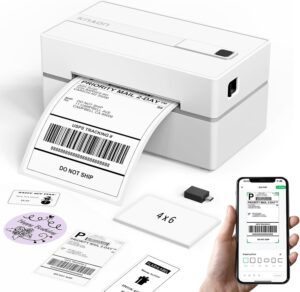
The listed price is $44.99, currently shown as 10% below the typical $49.99 price.
- Brand: KNAON
- Model: Y813BT
- Connectivity: Bluetooth
- Printing: Thermal monochrome
- Weight: 2.75 pounds
- Compatible devices: iPhone, Android, Windows, Mac
- Use case: Shipping labels for small online businesses
If you want a relatively affordable Bluetooth printer that can sit beside a small packing station, this model is worth looking at.
Check the KNAON Bluetooth Thermal Shipping Label Printer on Amazon
2. ETIKEZ PL50E Bluetooth Thermal Shipping Label Printer
The ETIKEZ PL50E is another 4×6 Bluetooth thermal shipping label printer designed for ecommerce shipping.
It supports Bluetooth and USB, which gives you more flexibility if you switch between a smartphone and computer. The package also includes a power cable, power adapter, USB cable, user manual, and 15 pieces of 4×6 thermal labels.
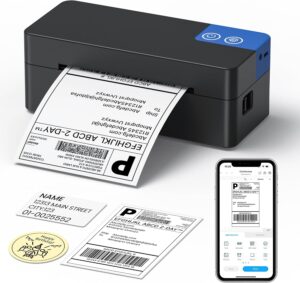
The listed price is $45.99, shown at 28% below the $63.99 list price.
- Brand: ETIKEZ
- Model: PL50E
- Connectivity: Bluetooth and USB
- Printing: Thermal monochrome
- Weight: 2 pounds
- Compatible platforms: Amazon, Shopify, USPS, UPS, Etsy
- Included: 15 pieces of 4×6 thermal labels
The combination of Bluetooth and USB makes it an interesting option for sellers who want both wireless convenience and a traditional computer connection.
Check the ETIKEZ PL50E Thermal Label Printer on Amazon
3. JADENS JD268BT Bluetooth Thermal Shipping Label Printer
The JADENS JD268BT is a wireless 4×6 thermal shipping label printer designed for sellers using Amazon, Shopify, Etsy, and USPS.
It supports Android, iPhone, Windows, and Mac, making it suitable for businesses that do not want to be tied to one operating system.
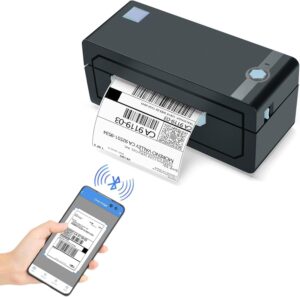
The listed price is $69.99, currently shown at 27% below the $95.99 list price.
- Brand: JADENS
- Model: JD268BT
- Connectivity: Bluetooth
- Printing: Thermal monochrome
- Weight: 3.7 pounds
- Compatible devices: Android, iPhone, Windows, Mac
- Compatible services: Amazon, Shopify, Etsy, USPS
It is worth considering if you want a wireless shipping printer from an established label-printer brand and your business regularly handles ecommerce orders.
Check the JADENS JD268BT Thermal Shipping Label Printer on Amazon
4. Rollo Wireless Shipping Label Printer
If your shipping operation is growing and you want a more premium option, the Rollo Wireless Shipping Label Printer is designed for a more flexible wireless setup.
It supports Wi-Fi and USB and offers AirPrint support for iPhone, iPad, and Mac. It also supports Windows, Chromebook, and Android devices.
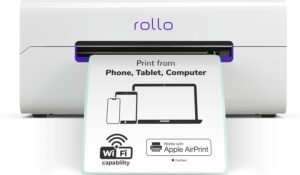
The listed price is $279.99, putting it in a significantly higher price category than the compact budget models above.
- Brand: Rollo
- Model: Wireless Rollo
- Connectivity: Wi-Fi and USB
- Printing: Thermal monochrome
- AirPrint: Yes
- Compatible devices: iPhone, iPad, Mac, Windows, Chromebook, Android
- Use case: Shipping and label printing for growing businesses
The main reason to consider a wireless model like this is convenience when several devices need to access the same printer. It can also make sense when shipping becomes a significant daily part of your business workflow.
Check the Rollo Wireless Shipping Label Printer on Amazon
5. JADENS C10 Bluetooth Thermal Label Printer
The JADENS C10 takes a slightly different approach with a built-in paper bin. It supports iOS, Android, Windows, Mac, and Chromebook and is designed for uses including Etsy, Shopify, and USPS.
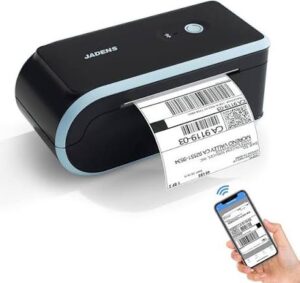
The listed price is $84.99.
- Brand: JADENS
- Model: C10
- Connectivity: Bluetooth
- Printing: Thermal monochrome
- Weight: 2.5 pounds
- Compatible devices: iOS, Android, Windows, Mac, Chromebook
- Special feature: Built-in paper bin
The built-in paper storage can be useful if you want a cleaner setup with fewer loose label supplies around your workspace.
Check the JADENS C10 Thermal Label Printer on Amazon
Which Portable Thermal Label Printer Is Right for You?
The right printer depends less on the name of your ecommerce platform and more on how you actually process orders.
| Printer | Connectivity | Good For | Listed Price |
|---|---|---|---|
| KNAON Y813BT | Bluetooth | Budget-conscious small businesses | $44.99 |
| ETIKEZ PL50E | Bluetooth, USB | Sellers wanting wireless and wired options | $45.99 |
| JADENS JD268BT | Bluetooth | Amazon, Etsy and Shopify sellers | $69.99 |
| Rollo Wireless | Wi-Fi, USB | Growing businesses and multi-device setups | $279.99 |
| JADENS C10 | Bluetooth | Compact setups with built-in label storage | $84.99 |
Prices are the listed prices supplied for this article and may change on Amazon.
What to Look for Before Buying a Thermal Label Printer
Do not choose a printer only because it says “thermal” on the product page. A few practical details matter for ecommerce sellers.
4×6 Label Support
If your main purpose is shipping, make sure the printer supports the label size required by your shipping workflow.
Device Compatibility
Check whether the printer works with your actual devices. If you manage your store from an iPhone, Android phone, Mac, or Chromebook, compatibility matters.
Bluetooth or Wi-Fi
Wireless connectivity can make a major difference when your packing station is separate from your computer.
USB Connectivity
USB is useful as a straightforward connection to a desktop or laptop. Some printers offer both wireless and USB connectivity, giving you more options.
Print Speed
If you ship only a few packages a week, extreme print speed may not matter much. If you print dozens of labels in one session, speed becomes more valuable.
Printer Size
Measure your available desk space before ordering. A printer that looks compact in a product listing may still need additional room for the label roll and cables.
How to Build a Simple Shipping Station
A thermal printer works best when it becomes part of a complete shipping workflow.
You do not need an expensive warehouse setup. A small table can be enough.
- Portable thermal label printer
- 4×6 thermal labels
- Digital shipping scale
- Shipping boxes or mailers
- Packing tape
- Scissors or box cutter
- Order-packing area
Keep frequently used supplies within arm’s reach. Once your order arrives, you should be able to pick the product, pack it, print the label, attach it, and place the parcel in the outgoing area without repeatedly leaving the station.
Does a Portable Thermal Label Printer Make Sense for a Small Business?
If you occasionally sell one product online, you may not need a dedicated shipping printer.
But if you regularly receive orders from Amazon, Etsy, Shopify, or your own ecommerce website, the calculation changes.
You are not simply buying a printer. You are buying a simpler fulfillment workflow.
The real advantage becomes more obvious as your order volume grows. Printing one label is not difficult. Printing 20 labels every afternoon is where a dedicated thermal printer starts saving time and reducing unnecessary work.
Final Thoughts
A portable thermal label printer can be a surprisingly useful upgrade for a small online business.
It takes up less space than many traditional printers, eliminates the need for ink or toner, supports convenient 4×6 shipping labels, and can connect directly to the devices you already use to manage your store.
More importantly, it helps turn shipping from a collection of small frustrating tasks into a repeatable process.
For a new seller, a compact Bluetooth model can be enough to get started. If your business is processing more orders or multiple people and devices need access to the printer, a more advanced wireless model may make more sense.
The goal is simple: receive the order, pack the product, print a clean label, attach it, and move to the next order.
That kind of smooth workflow gives you more time to focus on the parts of your business that actually grow revenue, such as finding products, serving customers, improving your listings, and generating more sales.
Amazon Affiliate Disclosure: Some links on this page are Amazon affiliate links. If you click a link and make a purchase, we may earn a commission at no additional cost to you.