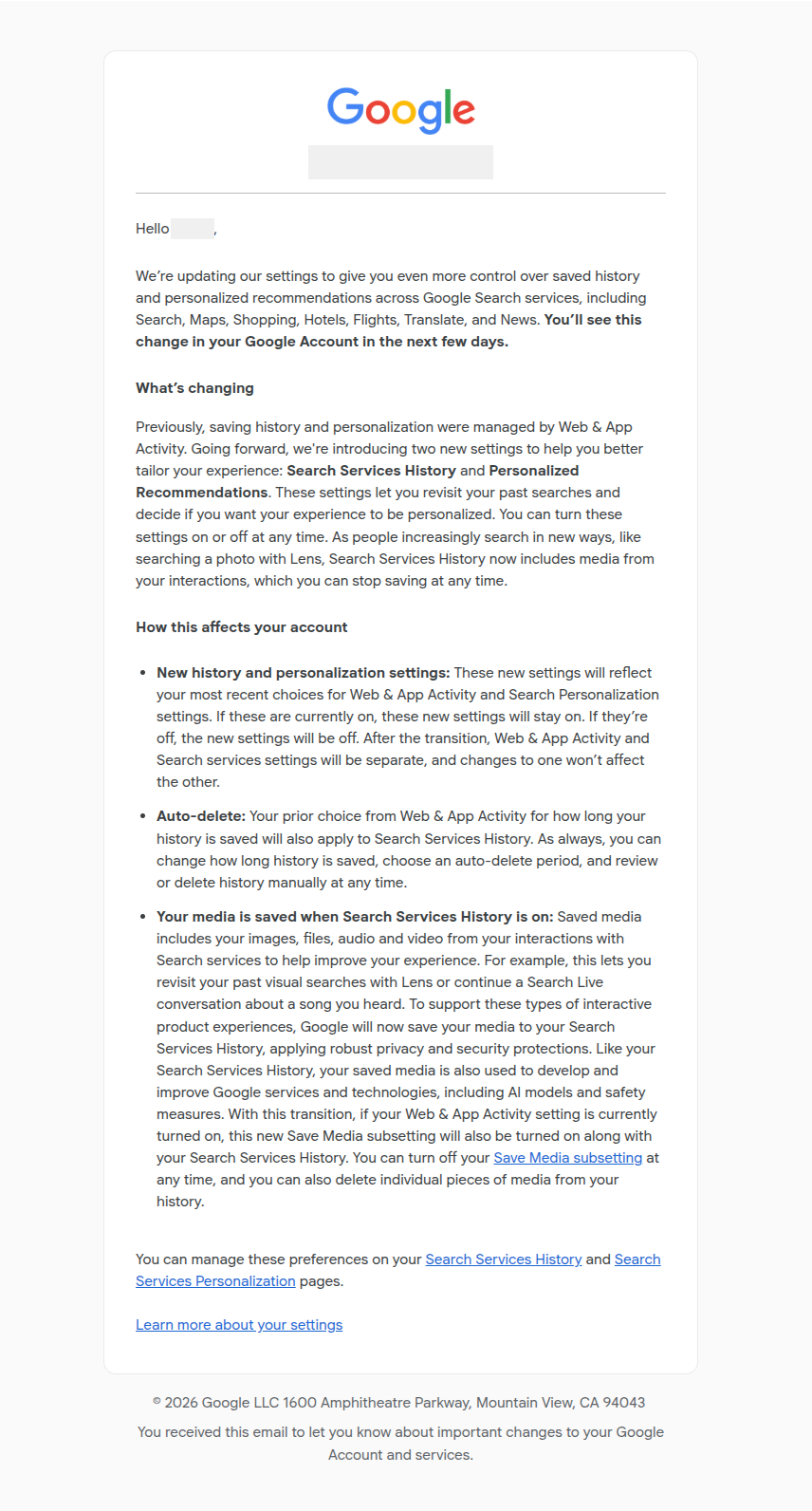
Google is rolling out a significant update to how users manage search history and personalization across its Search-related services, introducing two new account settings. Search Services History and Personalized Recommendations.
The change affects several Google products, including Search, Maps, Shopping, Flights, Hotels, Translate, and News. According to Google, the rollout will happen gradually over the coming months and is intended to provide users with more granular control over how their search-related activity is stored and used.
What Is Changing?
Historically, search history and personalization for many Google services were primarily managed through the Web & App Activity setting. Under the new system, Google is separating these controls into two independent settings.
- Search Services History
- Personalized Recommendations
Google says the change is designed to allow users to independently decide whether their search interactions are saved and whether those interactions are used to personalize their experience.
The company noted that these new settings will initially inherit users’ existing preferences. For example, users who currently have Web & App Activity enabled will generally find Search Services History enabled after the transition.
Search Services History Now Includes More Than Search Queries
One of the most notable aspects of the update is Google’s expanded definition of search history.
According to Google’s support documentation, Search Services History can include.
- Search queries
- Information from websites visited through Search services
- Generative AI responses
- General location information
- Images uploaded through Google Lens
- Files uploaded during searches
- Voice searches
- Audio and video interactions
- Search Live conversations
- Translate speaking practice recordings
Google describes these additions as necessary to support newer search experiences, including visual search, conversational search, and AI-powered features.
New “Save Media” Subsetting
Alongside Search Services History, Google is introducing a new Save Media subsetting.
When enabled, media from interactions with Search services may be stored in a user’s account history. Examples include.
- Images used in Google Lens
- Uploaded files
- Audio recordings
- Video content associated with Search interactions
Google says this allows users to revisit previous visual searches, continue conversations, and access past interactions across supported services.
Users can disable Save Media independently and can delete individual pieces of saved media from their history.
AI Development and Service Improvement
Google’s documentation states that Search Services History may be used to.
- Provide Google services
- Develop and improve products
- Enhance safety systems
- Train generative AI models
The company notes that when Search Services History is turned off, future Search services activity will not be used to train Google’s generative AI models unless the user voluntarily provides feedback.
Google also states that data used for AI training is disconnected from users’ Google Accounts before being used for model development.
Additionally, the company says it employs automated filtering systems intended to remove identifying and sensitive information and that permission will be requested before media is shared with trained service providers for human review as part of model improvement processes.
Personalized Recommendations Become a Separate Setting
The second new setting, Personalized Recommendations, controls whether Google uses account information to tailor experiences across Search services.
According to Google, personalized recommendations may affect.
- Search results
- News feeds
- Content suggestions
- AI-generated responses
- Topic recommendations
- Location-based relevance
Google says personalization may draw from Search Services History, profile information, and other saved activity across Google products, depending on a user’s account settings.
For example, users who frequently search for a particular topic may see more related content, while AI-powered features may generate responses that reflect prior interests or search behavior.
What Is Not Included?
Google clarifies that Search Services History applies only to specific Search-related products.
The setting does not control history stored by.
- Gemini Apps
- YouTube
- Google Assistant
- Chrome browsing history and sync features
These services continue to operate under their own separate activity and history settings.
Existing User Settings Will Carry Over
As part of the transition, Google says users’ previous choices will determine the initial state of the new settings.
Examples include.
- If Web & App Activity was enabled, Search Services History will generally be enabled.
- If Search Personalization was enabled, Personalized Recommendations will generally be enabled.
- If both settings were disabled previously, the new settings will remain disabled.
Users will retain their existing auto-delete preferences and can continue choosing how long history is stored.
What Users Should Review
As the rollout reaches more accounts, users who want to understand or adjust their privacy preferences may wish to review.
- Search Services History
- Save Media
- Personalized Recommendations
- Auto-delete settings
Google says all of these controls can be managed through users’ Google Account privacy settings.
Industry Context
The update arrives as search platforms increasingly incorporate AI-powered experiences, multimodal search capabilities, image recognition, voice interaction, and conversational interfaces.
As search behavior evolves beyond text queries, companies face growing pressure to provide clearer controls over how user data, uploaded media, and AI interactions are collected, stored, and used.
Google describes the new settings as an effort to give users more direct control over those decisions while maintaining access to personalized and AI-assisted features.
References
- Google Support. Search Services History & Personalized Recommendations
https://support.google.com/websearch/answer/17025248 - Google Account Privacy Controls
https://myaccount.google.com - Google Privacy Policy
https://policies.google.com/privacy
