A common myth says Google Blogger cannot rank. That claim usually comes from blogs that never finished basic settings, never wrote useful posts, or stayed private to search engines. Search visibility depends on crawl access, clear pages, and content worth ranking. That is true on Blogger and on WordPress.
Blogger does not offer Yoast or Rank Math. You handle SEO with Settings, post-level search descriptions, theme quality, and publishing habits. Follow this 2026 guide to configure Blogspot SEO settings, improve each article, and connect Google Search Console without chasing gimmicks. If you still need to create the blog first, start with how to create a blog in Blogger.

Why Blogger SEO still matters in 2026
SEO is how search engines discover, understand, and decide whether to show your pages. Settings help crawlers reach the right URLs. Content quality decides whether those URLs earn clicks and return visits. Platform choice is not a ranking cheat code. Helpful posts with clean technical basics still win.
This guide splits into two parts. First, Blogger dashboard settings that make the site crawlable and fast enough. Second, article habits that help individual posts compete. For traffic strategy beyond settings, see COMPROMATH’s organic traffic guidelines.
Part one. Blogger SEO settings
Work through these settings before you obsess over keywords. A private blog or a site with broken HTTPS will not rank no matter how clever the title is.
1. Make the blog public and visible to search engines
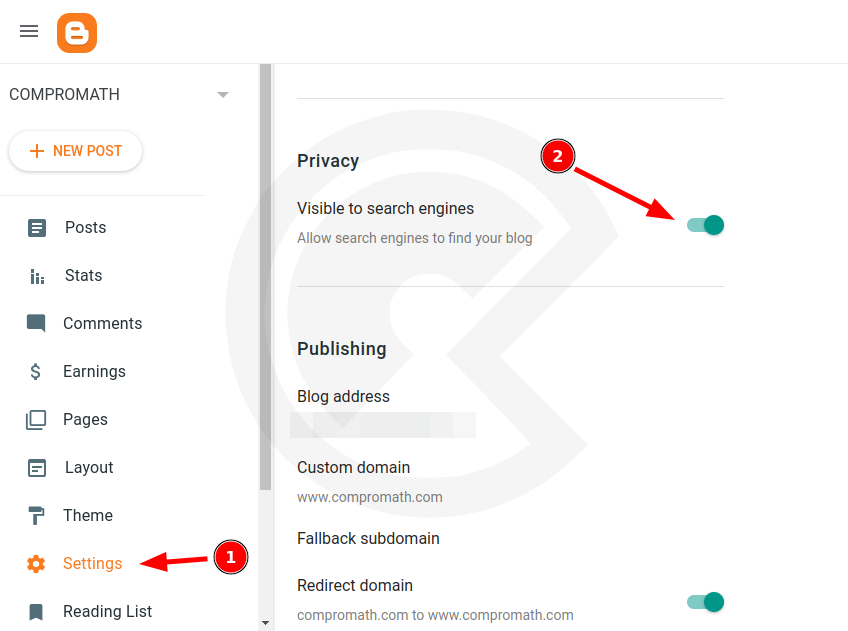
Open Settings, then Privacy. Turn on Visible to search engines. Set reader access to Public unless the blog is meant to stay private. A draft-stage private blog is fine. A monetization blog left invisible is a self-inflicted problem.
2. Set a clear blog title and description
Under Settings and Basic, write a title that names your niche. Add a short description that states who the blog helps and what it covers. Avoid empty slogans. Searchers and browsers use these signals to understand the site.
3. Enable search descriptions and meta tags
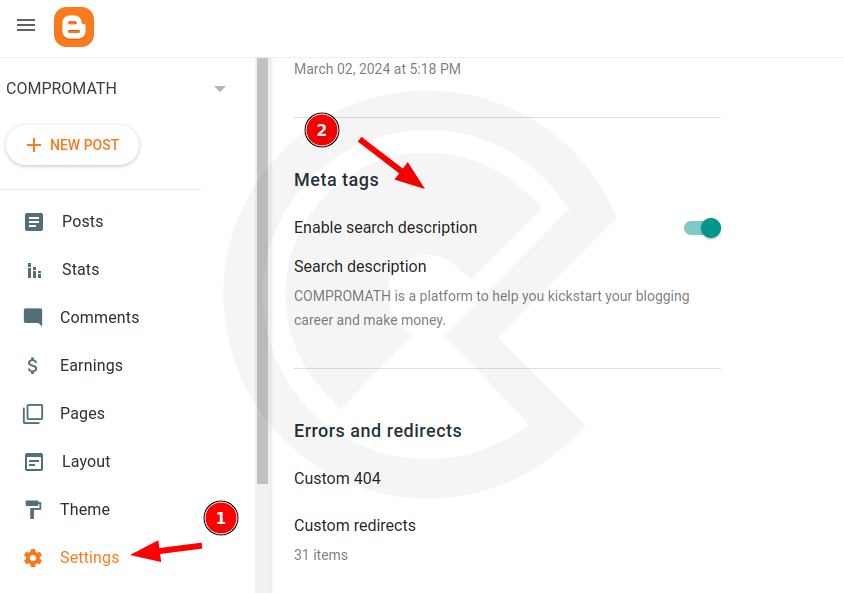
In Settings under Meta tags, enable search description. Write a homepage search description that summarizes the blog in roughly one hundred fifty characters. After this is on, each post editor shows a Search description field. Use it. Without it, Google often invents a messy snippet from sidebars or random sentences.
For deeper meta tag work and theme-level markup, see meta tags for Blogger.
4. Turn on HTTPS for custom domains
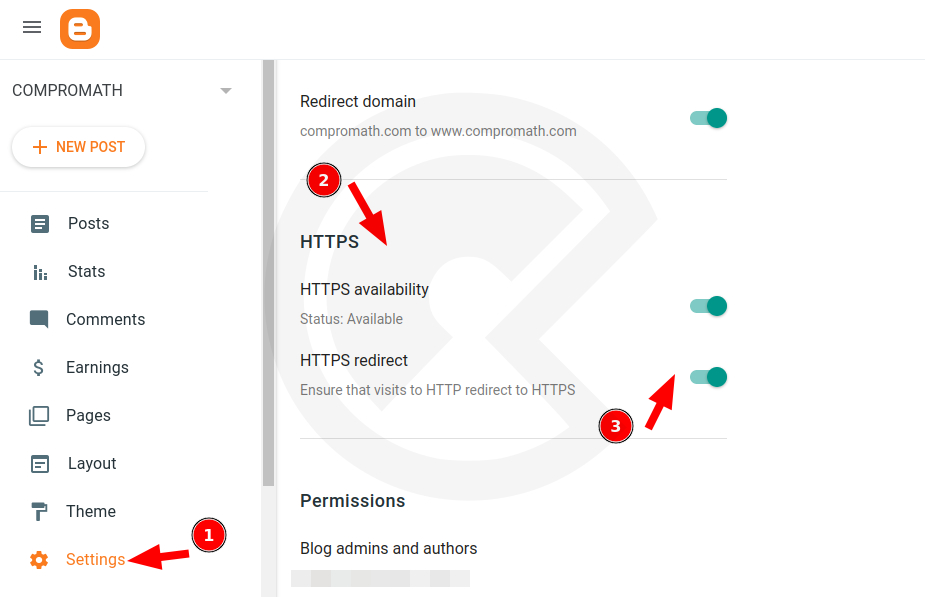
Blogspot subdomains already load securely. If you use a custom domain, open Settings and HTTPS, then enable both HTTPS availability and HTTPS redirect. Propagation can take a little time. Wait before you panic and toggle settings repeatedly.
A clean custom domain also helps branding and later monetization. COMPROMATH’s domain guides cover custom domains for Blogger and Namecheap DNS mapping.
5. Enable lazy load and WebP where available
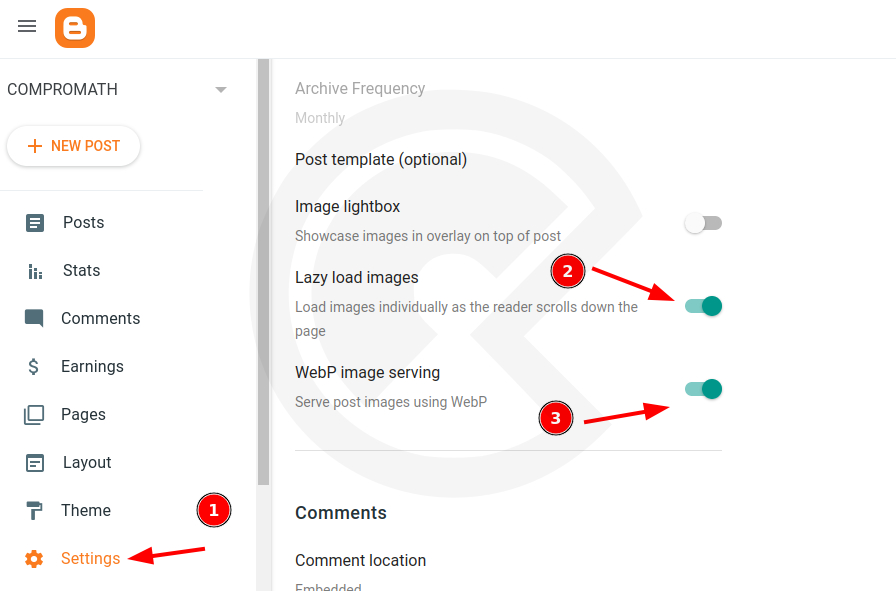
Under Settings and Posts, turn on lazy load images and WebP image serving when those options appear. Lighter images and delayed offscreen loading help mobile experience and Core Web Vitals style performance. Still compress oversized photos before upload. Settings cannot rescue a five-megabyte hero image.
6. Customize robots.txt carefully
Open Settings, then Crawlers and indexing. Enable custom robots.txt if you need clearer crawl rules. A safe pattern allows the site, blocks thin search-result URLs, allows AdSense’s Mediapartners crawler, and points to your sitemaps. Replace the sample domain with your real domain before you save.
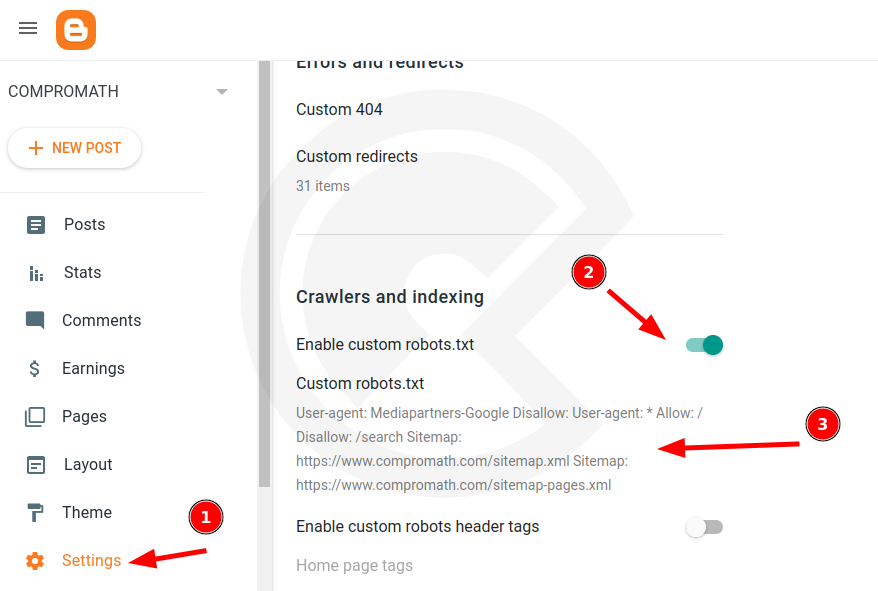
User-agent: Mediapartners-Google
Disallow:

User-agent: *
Allow: /
Disallow: /search

Sitemap: https://YOURDOMAIN.com/sitemap.xml
Sitemap: https://YOURDOMAIN.com/sitemap-pages.xml
A broken robots file can hide the whole blog. If you prefer a guided builder, use COMPROMATH’s Blogger robots.txt generator. After changes, open /robots.txt on your live domain and confirm the text matches what you intended.
7. Set robots header tags for archives
Still under Crawlers and indexing, enable custom robots header tags when you want tighter control. A common setup keeps the homepage and posts indexable, while archive and search pages use noindex with follow. That reduces duplicate-looking label and date archives competing with your real posts. Do not noindex the posts themselves.
8. Connect Google Search Console and submit sitemaps
From the same crawlers section, open the Google Search Console link and verify the property. Blogspot blogs on the same Google account often verify easily. Custom domains may need a DNS TXT record.
Submit sitemap.xml and, when relevant, sitemap-pages.xml. Large blogs may also use paginated sitemap URLs. After publishing important posts, use URL Inspection for key pages. Watch Coverage or Pages reports for soft 404s, redirected leftovers, and accidental noindex mistakes.
Part two. On-page SEO for every Blogger post
Settings open the door. Posts earn the ranking. Optimize each article like a landing page for one clear search intent.
Write titles people and search engines can trust
Keep titles specific and readable, often near fifty to sixty characters so they display cleanly. Place the main topic early when it still sounds natural. Skip clickbait that the article cannot deliver. Disappointed readers bounce, and that wastes the crawl you worked for.
Use a custom permalink
In the post editor under post settings, open Permalink and choose a custom URL with short, readable words. Set this before the first publish when you can. Changing URLs later needs redirects under Settings and Errors and redirects so old links do not die.
Fill the search description for every important post
Write a unique search description that states the promise of the post in one or two sentences. Include the topic naturally. Treat it as ad copy for the search result, not a keyword list.
Structure with headings, images, and links
Break long posts with clear subheadings so scanners can find sections. Add a relevant featured image near the top. Write useful alt text that describes the image. Link to related posts on your blog so readers and crawlers move through your best work. Use a few external references when they add proof, not as spam.
Use labels with restraint
Two or three focused labels beat a dozen vague tags. Labels help readers browse and help you build topical clusters. They are not a magic keyword stuffing field.
Place keywords where they help reading
Use the main topic in the title, early in the introduction, in at least one subheading when it fits, in the search description, and in image alt text when accurate. Prefer natural long-tail phrases that match what people ask. If a sentence only exists to repeat a keyword, delete it.
Theme, schema, and social previews
Modern official themes such as Contempo, Soho, and Emporio already include solid head markup for many blogs. Premium templates often ship with Open Graph tags and schema. If your theme is old or stripped, you may need custom head code. Edit HTML only after you back up the theme.
COMPROMATH’s guides to Blogger meta tags, fixing structured data errors, and Facebook Open Graph on Blogger cover that layer without turning this settings article into a fragile copy-paste minefield. For template edits, also see editing Blogger templates.
Speed and UX habits that support SEO
Pick a lightweight responsive theme. Limit gadget clutter above the fold. Compress images. Avoid autoplay media. Test posts on a phone. Search engines care about usable pages, and readers decide in seconds whether to stay.
Breadcrumbs and clean navigation help humans move around. If your theme supports them, configure them thoughtfully using guides such as adding breadcrumbs in Blogger.
Quick Blogger SEO checklist
| Area | Action |
|---|---|
| Privacy | Public blog, visible to search engines |
| Identity | Clear title and blog description |
| Meta | Search descriptions enabled sitewide and per post |
| HTTPS | Secure custom domain with redirect on |
| Images | Lazy load, WebP, compressed uploads |
| Robots | Safe custom robots.txt and sensible header tags |
| Search Console | Property verified, sitemaps submitted |
| Posts | Custom permalinks, headings, internal links, focused labels |
After SEO settings, keep publishing
Configuration is a morning’s work. Rankings come from consistent useful articles in a clear niche. Update older posts when they go stale. Internally link new guides to related archives. Watch Search Console queries and improve pages that already get impressions.
When the blog is healthy and you want display ads, prepare carefully with the Blogger AdSense approval checklist. If you later outgrow Blogger’s limits, compare options in Blogger versus WordPress for making money and the advantages and disadvantages of Blogger.
Blogger can rank in 2026. Make the site crawlable, make pages fast enough to read, and publish work that deserves the click. Settings start the engine. Content steers the car.

hello
more explication in this step:
Next, search for and put the below code.
remplace or past under ?
thnak you
Paste under.Thank you for your suggestion.
This guide offers practical and up-to-date SEO tips for Blogspot users. The emphasis on optimizing post titles and image alt texts aligns well with Google’s current SEO best practices. Implementing these strategies has already shown improvements in my site’s visibility. Looking forward to more insights in future posts.
This article is wonderfully written, readable and rich especially for me as a beginner. Thanks alot.
Lalu bagaimana dengan pengaturan lainnya kak untuk setting blogger
please am starting new on blogger can you help me out
Hello Jerry! You can browse article from here https://compromath.com/blogging/ . If you need still help, please reach out me through https://compromath.com/contact-us/
Thank you so much, Sir, for sharing such valuable information. God bless you! 🙏🥰 Your information has been really helpful to my blog, and I truly appreciate your time and effort. Please keep up the good work. I’m very grateful! ❤️